
သက္တန္႔ေရာင္အလံဟာ အခုလက္ရွိကာလမွာ အမ်ားဆံုးအသံုးျပဳေနတဲ့ ကမၻာေပၚရိွမတူညီကြဲျပားေသာ လိင္တူခ်စ္သူေတြကို ကိုယ္စားျပဳတာျဖစ္ပါတယ္။ အေမရိကန္ႏိုင္ငံ ဆန္ဖရန္စၥကိုၿမိဳ႕မွာ လိင္တူခ်စ္သူအခြင့္အေရးအတြက္ စတင္ လႈပ္ရွားလာခဲ့တဲ့ ၁၉၇၈ခုႏွစ္ အခ်ိန္ကေန စတင္အသုံးျပဳခဲ့တာလို႔ဆိုပါတယ္။ ေရာင္စဥ္ေျခာက္သြယ္နဲ႔ ဖြဲ႔စည္းထားတဲ့ သက္တန္႔ေရာင္အလံကို ႏိုင္ငံတကာက လိင္တူခ်စ္သူအေတာ္မ်ားမ်ားက ကုိယ္စားျပဳတဲ့ သေကၤတအေနနဲ႔ အသိအမွတ္ျပဳၾကပါတယ္။
ထိပ္ဆုံးမွာ အနီေရာင္နဲ႔စတင္ၿပီး ေအာက္ဆုံးမွာ ခရမ္းေရာင္နဲ႔ အဆုံးသတ္ထားတာျဖစ္ပါတယ္။ ခရမ္းေရာင္က အသက္၀ိညာဥ္ကို ရည္ညြန္းတာျဖစ္ၿပီး၊ အနီေရာင္ကေတာ့ ဘ၀အသက္တာကိုကိုယ္စားျပဳတယ္။ လိေမၼာ္ေရာင္ကေတာ့ ကုစားျခင္းကိုကိုယ္စားျပဳတယ္။ အ၀ါေရာင္ကေတာ့ ေနကိုကိုယ္စားျပဳတယ္။
အစိမ္းေရာင္က တည္ၿငိမ္ေအးခ်မ္းမႈကိုကိုယ္စားျပဳၿပီးေတာ့ အျပာေရာင္ကေတာ့ ဟန္ခ်က္ညီျခင္းကို ကိုယ္စားျပဳတယ္လို႔ ဆိုပါတယ္။ ေရာင္စဥ္ ေျခာက္သြယ္နဲ႔ဖြဲ႔စည္းထားတဲ့ သက္တန္႔ေရာင္အလံေတြကိုေတာ့ ဆန္ဖရန္ဆစၥကိုက ကယ္စထရိုနဲ႔ နယူးေယာက္ၿမိဳ႕က လိင္တူခ်စ္သူမ်ား အစည္းအရုံးအဖြဲ႔ေတြမွာ လြင့္ထူထားတာကို ေတြ႔ႏိုင္တယ္လို႔သိရပါတယ္။
အခ်ိဳ့လိင္တူခ်စ္သူေတြရဲ့ နာမည္ေတြမွာ သက္တန့္ ဆိုျပီးထည့္ထားၾကတယ္...ဥပမာ သက္တန့္ေအာင္ ၊ သက္တန့္ႏွင္း၊ ႏိုင္သက္တန့္ စသည္ျဖင့္ေပါ့...
နာမည္ေလးေတြတိုက္ဆိုင္သြားရင္ခြင့္လႊတ္ပါ...ဥပမာေျပာထားတာပါ...
ဒါေပမယ့္ သက္တန့္နာမည္ပါတိုင္း လိင္တူခ်စ္ၾကသူမ်ားမဟုတ္သလို သက္တန့္သေက္တ ပါတဲ့အလံတိုင္းဟာ လိင္တူခ်စ္ၾကသူမ်ားရဲ့သေက္တမဟုတ္ဘူးဆိုတာကိုေတာ့ သတိခ်ပ္သင့္ပါတယ္...
Ref:http://www.forplu.com/community/life&style/symbols/symbols_meanings.htm
THE RAINBOW
The rainbow flag has become one of the most widely used and recognized symbols of the gay pride movement. The concept of the rainbow is hardly a new one. Rainbows have used since ancient times in all kinds of cultures- Greek, African, Native American and Celtic, to name only a few. Even Jesse Jackson's Rainbow Coalition has made use of the rainbow has a freedom symbol.
Use of the rainbow flag by the gay community began in 1978 when it first appeared in the San Francisco Gay and Lesbian Freedom Day Parade. Borrowing symbolism from the hippie movement and black civil rights groups, San Francisco artist Gilbert Baker designed the rainbow flag in response to a need for a symbol that could be used year after year. Baker and thirty volunteers hand-stitched and hand-dyed two huge prototype flags for the parade. The flags had eight stripes, each color representing a component of the community: hot pink for sex, red for life, orange for healing, yellow for sun, green for nature, turquoise for art, indigo for harmony, and violet for spirit.
The next year Baker approached San Francisco Paramount Flag Company to mass-produce rainbow flags for the 1979 parade. Due to production constraints -- such as the fact that hot pink was not a commercially-available color -- pink and turquoise were removed from the design, and royal blue replaced indigo. This six-color version spread from San Francisco to other cities, and soon became the widely-known symbol of gay pride and diversity it is today. It is even officially recognized by the International Congress of Flag Makers. In 1994, a huge 30-foot-wide by one-mile-long rainbow flag was carried by 10,000 people in New York's Stonewall 25 Parade.
|
* * * * * *
Labels: Knowledge-III, Knowledges-II


ဒီသတင္းကေတာ့ ဇူလိုင္လကဆိုေတာ့နဲနဲၾကာပါျပီ....ပိုစ့္တစ္ခုအေနနဲ့ေဖၚျပရျခင္းအေၾကာင္းကေတာ့ ဘယ္အခ်ိန္ဘယ္ေနရာမွာမဆိုအစစအရာရာ ဆင္ျခင္ေနႏိုင္ေအာင္ ႏွင့္ မိုက္ကရိုဖုန္းကလည္း ဓါတ္လိုက္ႏိုင္တာကိုသိေစခ်င္လို့ပါ....
လားရႈိးၿမိဳ႕ လားရိႈးေကာလိပ္အနီး သီရိေရႊစင္ကာရာအိုေကဆိုင္ တြင္ ၂၇.၇.၂၀၁၀ ည ၈ နာရီခြဲ၀န္းက်င္တြင္ ကာရာအိုေကစက္ခ်ိဳ႕ယြင္းခ်က္ေၾကာင္႕ သီခ်င္းဆိုေသာ မိုက္ကရိုဖုန္းတြင္ ျပင္းထန္ေသာလွ်ပ္စစ္စီးေၾကာင္းျဖစ္ေပၚၿပီး ပထမထပ္တြင္ သီခ်င္းဆိုေနေသာ ေမာင္ေစာမားကတ္စ္ ဖရီးဒမ္း (ဦးေစာတိုင္းေက်ာ္) + ေဒၚနန္းေဆာင္ခမ္းတို႕၏ သားၾကီး၊ ႏြဲ႔ေနာရပ္ကြက္၊ က်ိဳင္းတံုၿမိဳ႕ေနုသူ အသက္ ၂၇ ႏွစ္အရြယ္ လူငယ္တဦးကို ေနရာတြင္ပင္ခ်က္ခ်င္း ေသဆံုးေစခဲ႕သည္ဟုသိရသည္။ၾကမ္းခင္းသည္ ေၾကြျပားခင္းထားၿပီး မည္သည့္လၽွပ္ကာပစည္းမွ ခင္းက်င္းထားျခင္း မရွိဟုသိရသည္။ ထိုအျဖစ္ေၾကာင္႕ ထူးခ်ြန္ထက္ျမက္ၿပီး မိခင္မုဆိုးမ ႏွင္႕ေက်ာင္းသားညီငယ္ ၂ ဦးကို အလုပ္အေကၽြး
ျပဳေနေသာ ႏိုင္ငံတကာလူမႈကူညီေရးအဖြဲ႔ ကဲရ္အင္တာေနရွင္နယ္ျမန္မာ ၏ Field Office Coordinator အျဖစ္တာ၀န္ထမ္းေဆာင္ေနေသာ ၀န္ထမ္းတစ္ဦး အသက္ဆံုးရံႈးခဲ႕ရသည္။ မိသားစုႏွင္႕ခြဲခြာၿပီး တနယ္တေက်းးတြင္ သြားေရာက္အလုပ္လုပ္ကိုင္ေနသာ သားျဖစ္သူ၏ အျဖစ္ဆိုးေၾကာင့္ က်ိဳင္းတံုၿမိဳ႔မွ လားရိႈးၿမိဳ႕သို႕ အေျပးေရာက္လာေသာ မိခင္ေဒၚနန္းေဆာင္ခမ္းႏွင္႔ ညီႏွစ္ဦးအား ကာရာအိုေက ဆိုင္ပိုင္ရွင္သည္ ရပ္မိရပ္ဖမ်ားႏွင္႔အတူလာေရာက္ေတြ႕ဆံုၿပီး ကာယကံရွင္မ်ားႏွင္႕ ထပ္တူ၀မ္းနည္းေၾကာင္း၊ ၄င္းတို႕႔မွ နစ္နာေၾကးေငြ က်ပ္သိန္း (၃၀) ေပးမည္ျဖစ္ေၾကာင္းႏွင္႕အမႈကို ကာယကံရွင္ဘက္မွ ေက်ေအးေပးရန္ဟု ေတာင္းဆိုျခင္းကို အားလံုးေရွ႕တြင္ကတိေပးႏွစ္ဦးသေဘာတူခဲ႕သည္။
Labels: Knowledges-II





Source(s):
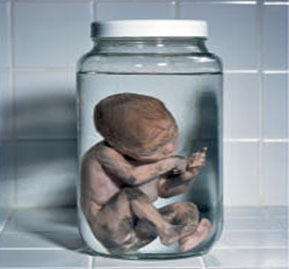
လူေျခာက္ဆိုတာကေတာ့ဘံုဘ၀တမ်ိဳးမွ သတၱ၀ါမဟုတ္ပါ၊ ခႏၶာငါးပါးရွိသည့္ လူ႔ဘ၀၌ပင္ ဇလာဗုဇ ပဋိသေႏၶေနၾကသူမ်ား ျဖစ္ပါသည္။ ဗုဒၶစာေပအရဆိုေသာ္ ပထမံ ကလလံ ေသာတိ၊ ကလလာ ေဟာတိ အဗၺဳဒံ၊ စေသာ သံယုတ္ပါဠိေတာ္လာအတိုင္း
* အမိ၀မ္းတြင္း ကလကေရၾကည္ တစ္သတၱာဟ (ခုနစ္ရက္တပတ္)။
* အျမွဳပ္ တစ္သတၱာဟ။
* သားတစ္ တစ္သတၱာဟ။
* အခဲ တစ္သတၱာဟ။
* ဦးေခါင္း ေျခလက္ ခက္မငါးျဖာ တစ္သတၱာဟ ျဖစ္၍
* ၄င္းငါးသတၱာဟ (ခုနစ္ရက္ ငါးလီ) အလြန္ သတၱာဟ အနည္းငယ္မွ် ရင့္မာခဲ့ျပီး အမိ၀မ္းတြင္ ကြယ္လြန္ခဲ့ပါသည္။
၄င္း၏အသက္၀ိညာဥ္သည္ ပဋိသေႏၶအစ ကလကေရၾကည္ တည္စကပင္ ျဖစ္ခဲ့ေသာ္လည္း ေဖာ္ျပပါ ငါးသတၱာဟအလြန္ ၁၀၊ ၁၂- သတၱာဟ အတြင္း ေသဆံုး၍ သေႏၶ ၂-လေက်ာ္ ၃-လနီးပါးအရြယ္ လူသားေလာင္း ရုပ္ၾကြင္းသာ အမိ၀မ္းတြင္က်န္ခဲ့ျပီး ကံအားေလ်ာ္စြာ ေပတဘ၀ (ဂႏၶဗၺ ေ၀မာနိကၿပိတၱာ) မ်ိဳးတြင္ ျဖစ္ေလသည္။ (ေရွးဘ၀ ေကာင္မႈအက်ိဳးေၾကာင္႔ သုဂတိဘံုကို ပဋိသေႏၶေတာ႔ ေနခြင္႔ရသည္။ ရွင္သန္ခံစားခြင္႔မရဘဲ ေသသြားရရွာသည္။)
အသက္၀ိညာဥ္မဲ့ေသာ သေႏၶသားမွာ ပ်က္က်ရမည္ျဖစ္ေသာ္လည္း တစံုတခုေသာ အေၾကာင္း ( ဥပမာ-ေတေဇာဓာတ္ လြန္ကဲမႈ) ေၾကာင့္ ပ်က္က်မသြားဘဲ တျဖည္းျဖည္း ေျခာက္သြားရပါသည္။ ၄င္း ေျခာက္သြားသည္ႏွင့္ ၂-၃ လအရြယ္ ႀကီးေနေသာ အမိ၀မ္းသည္လည္း ျပန္လည္ပိန္ၾကံဳ၍ သြားကာ ေန႔ေစ့ခ်ိန္ (၄၂-သတၱာဟခန္႔ )တြင္ ဖြားျမင္သည္။ ထိုအခါ မရင့္မာမီ အမိ၀မ္းတြင္းမွာပင္ ေသဆံုးေျခာက္ကပ္သြားရ၍ မႀကီးျပင္းႏိုင္ဘဲ ခက္မငါးျဖာ မ်က္စိ နား ႏွာေခါင္း အရာပါရံုမွ် ရွိသည့္ လူသားေလာင္း အေျခာက္ကေလး ( ၄-လက္မအရြယ္ ) မွ်သာ ေမြးဖြားလာခဲ့ရသည္။
ထိုအခါ၌ ၄င္းလူသားေလာင္းကေလးမွ ဘ၀ေျပာင္း၍ ျဖစ္ေနေသာ ဂႏၶဗၺ (သို႔မဟုတ္) ေ၀မာနိကျပိတၱာမွာ ေလခၽြန္နတ္သူငယ္ ကဲ့သို႔ အသင့္အတင့္တန္ခိုးရွိသျဖင့္ ၄င္း၏ရုပ္ၾကြင္း လူေျခာက္ကေလးကို တြယ္တာစြဲ၀င္၍ ေနလာေလသည္။ ထို႔ေၾကာင့္ ဆိုင္ရာ မိဘစသည္တို႔အား အိပ္မက္ေပးျခင္း၊ အရိပ္အေရာင္ျပျခင္း စသည္ ျပဳလုပ္ႏိုင္ေလသည္။
အထက္ပါတို႔ကို ေထာက္၍ လူေျခာက္သည္ အသက္ရွင္ျခင္း၊ အာဟာရမွီ၀ဲျခင္း၊ က်င္လည္လႈပ္ရွားျခင္း မရွိ၊ ၄င္းအား မွီတြယ္စြဲ၀င္ေနေသာ ေ၀မာနိက ေပတ၊ ဂႏၶဗၺ၏ သေဘာသဘာ၀ အတိုင္းသာလွ်င္ ျဖစ္ေၾကာင္း မွတ္သားသင့္ပါသည္။ ( အမိ၀မ္းတြင္းတြင္ ေသဆံုးျပီး ေ၀မာနိကေပတ ဂႏၶဗၺ မျဖစ္၊ သို႔မဟုတ္ မွီတြယ္ စြဲကပ္မႈ မရွိ၍ မထူးမျခား အေသအတိုင္း ေမြး၍ စြန္႔ပစ္ရေသာ လူေျခာက္မ်ားလည္း ရွိေသးေၾကာင္း သိရပါသည္။ ၄င္းလူေျခာက္ျပႆနာကို ေဆးပညာ ရႈေထာင့္မွလည္း ေလ့လာသင့္ေသးသည္။)
What is a stillbirth?
Stillbirth is the death of a baby after the 20th week of pregnancy, but before delivery. The baby may have died in the uterus weeks or hours before labor, or during labor.
How common are stillbirths?
About one in every 150 births, or 1% of all births, is a stillbirth.
What causes stillbirths?
The three major causes of stillbirths are:
- Problems with the placenta and/or umbilical cord. Because the fetus gets its blood, oxygen and nutrients through the placenta and umbilical cord, problems in either will interfere with fetal development.
- Maternal medical conditions and lifestyle choices. Certain illnesses in the mother, or their treatments, sometimes cause stillbirths. Some of these conditions include chronic hypertension (high blood pressure), preeclampsia, diabetes, lupus, heart or thyroid disease and certain viral or bacterial infections. Older mothers are usually at increased risk for these conditions, as well as for stillbirths. Smoking, drinking alcohol, and using certain recreational drugs during pregnancy are also associated with higher rates of stillbirth.
- Birth defects. In about one-fourth of stillborn babies, one or more birth defects are responsible for the death. Many are found only after a thorough examination of the baby and an autopsy.
Unfortunately, more than half of stillbirths are unexplained, which only adds to parents' grief.
What happens after a stillborn baby is delivered?
You will be able to hold your baby, and your health care providers will allow you as much time as you need to spend with your child. You may feel uncomfortable with this idea, but it will be a cherished moment at a later time.
Keep and ask for any mementos and keepsakes of your child such as the I.D. bracelet, blanket, or a lock of your child's hair, and take as many pictures as possible. As with holding your baby, this may also be uncomfortable but it may be a cherished possession at a later time and may help you during your grieving process. Most hospitals will issue the family a birth certificate, but make sure you ask so you are sure to get one, and request that it include the baby's hand and footprints.
Test and examinations
The doctor will carefully examine the baby and placenta to check for abnormalities, and parents may be asked to consent to an autopsy and other studies. In most cases, a blood sample will be taken from the baby and tested for chromosomal abnormalities.
The doctor will also review medical records and the circumstances surrounding the stillbirth.
How can I find out what caused my baby to be stillborn?
Pending your consent, an internal examination (autopsy) can be performed to determine the cause of your baby's death. An autopsy is a surgical procedure performed by a skilled pathologist. Incisions are made to avoid any disfigurement. The incisions are surgically repaired in the usual way. A doctor can explain the procedure in more detail. You have the right to limit the autopsy to eliminate any incisions on your baby that are not comfortable for you (for instance, you can give instructions that no incisions are to be made on the baby's head). Be sure to write these requests on the autopsy permission form.
Some hospitals do not perform their own autopsies, so your baby may have to be transported to another hospital. Be sure you feel comfortable about where your child is being taken.
You have the right to deny an autopsy, if this is your wish.
An autopsy is legally required when:
- A baby has died within 24 hours of a surgical operation
- A doctor cannot certify the cause of death
- A baby has lived (defined as "drawing breath") and died suddenly
What physical symptoms will the mother have after delivering a stillborn baby?
If you have heavy bleeding, fever, chills or pain, contact your health care provider right away. These may be signs of an infection.
After the delivery of the placenta, the milk-producing hormones will be activated. Please talk to your health care provider about your options to stop lactation.
Can a stillbirth be prevented?
Usually a stillbirth cannot be prevented and often occurs because the baby's development was not normal.
Sometimes, treatment of a mother's illness can improve the chances for a successful pregnancy.
Is a funeral necessary?
After the death of your baby, one of the first decisions you will be faced with is whether or not you need to arrange a funeral.
The type of arrangements you make may play an important role in the grieving process. It is a decision that only you and your partner can reach together. You may find that you need time to make your decisions and arrangements. It is quite common for families to take up to a week (and sometimes longer) to make arrangements. This is okay.
No matter what your choice is, you have the right to change your mind " be sure you ask whoever is carrying out your arrangements just how long you have to make any changes.
How to communicate with your other children?
You may find your surviving children are a comfort, a worry or just too hard to deal with. These are normal reactions. Take time to grieve and say goodbye to the child you lost. You will eventually feel more normal feelings for your living children, and the bond you have with them may become even stronger because of this experience.
No matter how much you may want to shelter your children from pain, they can sense the emotion around them. Honesty is the best way to help your children cope with this painful experience. Children have a different understanding of death at different developmental stages. Help them to understand as much as they are able, but don't forget that they usually interpret what they're told very literally.
Can I get pregnant after I've delivered a stillborn baby?
Yes. Most women who deliver stillborn babies have subsequent normal pregnancies and births. If the stillbirth was caused by a malformation or umbilical cord problem, the chances of recurrence in a subsequent pregnancy are minimal. If the cause was a chronic maternal illness or a genetic disorder, the risk is somewhat higher. On average, the chance that a woman's next pregnancy will result in stillbirth is about 3%, which means the majority of post-stillbirth pregnancies result in healthy births.
Taking time to heal both physically and emotionally after delivering a stillborn baby is important. Regardless of the stage of pregnancy during which your loss occurred, you are still a mother or father and the life you nurtured was real. Above all, don't blame yourself. Give yourself time to grieve and accept your loss. Counseling is available to help you cope. Pregnancy loss support groups may also be a valuable resource to you and your partner. Ask your health care provider for more information about counseling and support groups.
Discuss the timing of your next pregnancy with your health care provider to ensure that you are physically ready to begin a new pregnancy. Some health care providers recommend waiting a certain amount of time (from 6 months to 1 year) before trying to conceive again. Some studies have shown that women who wait for at least one year to conceive may have less depression and anxiety during a subsequent pregnancy.
Statistics show that about 60% of couples take up to 6 months to conceive and another 30% take up to 12 months after delivery of a stillborn baby. Don't be surprised if things don't happen quickly.
Labels: Knowledges-II
အင္တာနက္ေပၚတြင္ နာမည္ေက်ာ္ၾကားေသာ သ႐ုပ္ေဆာင္မ်ား၏ ဓာတ္ပံုမ်ား၊ သတင္းမ်ားကိုအသံုးခ်ၿပီး ကြန္ပ်ဴတာသံုးစြဲသူမ်ားအား တုိက္ခိုက္ေလ့ရွိေသာ ျဖစ္စဥ္မ်ားကို အေျခခံၿပီး အင္တာနက္ေပၚမွ အႏၲရာယ္အရွိဆံုး သ႐ုပ္ေဆာင္မ်ားကို McAfee ကုမၸဏီက ႏွစ္စဥ္သတင္း ထုတ္ျပန္ေပးေနျခင္း ျဖစ္ပါသည္
ယခုႏွစ္တြင္ ထုတ္ျပန္ခဲ့ေသာ စာရင္းအရ ကင္မရြန္းဒီယက္ဇ္၏ ဓာတ္ပံုမ်ားႏွင့္ ကင္မရြန္းဒီယက္ဇ္ ပါ၀င္သ႐ုပ္ေဆာင္ေသာ Knight and Day ဇာတ္ကားကိုအသံုးျပဳၿပီး ၀က္ဘ္မ်ားမွတစ္ဆင့္ ကြန္ပ်ဴတာသံုး စြဲသူမ်ားကို တိုက္ခိုက္ခဲ့သည့္ ေဆာ့ဖ္၀ဲလ္မ်ား၊ ဗိုင္းရပ္စ္မ်ား အမ်ားဆံုး ေပၚထြက္လာခဲ့သည့္အတြက္ ကင္မရြန္းဒီယက္ဇ္ကို အင္တာနက္ေပၚ၌ အႏၲရာယ္အရွိဆံုး သ႐ုပ္ေဆာင္အျဖစ္ ေရြးခ်ယ္ခဲ့ျခင္းျဖစ္ပါသည္။
ကင္မရြန္းဒီယက္ဇ္ ေနာက္အႏၲရာယ္အရွိဆံုး သ႐ုပ္ေဆာင္ကိုးဦးကိုလည္း စာရင္းျပဳစုထုတ္ျပန္ထားၿပီး အႏၲရာယ္အရွိဆံုး သ႐ုပ္ေဆာင္ နံပါတ္(၂)ေနရာတြင္ ဂ်ဴလီယာေရာဘတ္ ေရြးခ်ယ္ျခင္းခံခဲ့ရသည္။ ဂ်ဴလီယာေရာဘတ္ကိုမူ လက္တေလာ ႐ုံတင္ေနသည့္ Eat Pray Love ဇာတ္ကားကို အသံုးခ်ၿပီးတုိက္ခိုက္ခဲ့ျခင္း ျဖစ္ပါသည္။ အႏၲရာယ္အရွိဆံုး သ႐ုပ္ေဆာင္ နံပါတ္(၃) ေနရာတြင္ ယခင္ႏွစ္က အႏၲရာယ္အရွိဆံုး သ႐ုပ္ေဆာင္အျဖစ္ နံပါတ္(၁) ေနရာတြင္ ေရြးခ်ယ္ခံခဲ့ရေသာ ဂ်က္ဆီကာဘီလ္က ေရြးခ်ယ္ခံထားရပါသည္။ နံပါတ္(၄)ေနရာတြင္မူ ေမာ္ဒယ္လ္ ဂီဆဲလ္ဘန္ခ်န္က ေရြးခ်ယ္ခံထားရၿပီး နံပါတ္(၅)ေနရာတြင္ ဘရက္ပစ္က ေရြးခ်ယ္ခံခဲ့ရပါသည္။ ဘရက္ပစ္သည္ အႏၲရာယ္အရွိဆံုး သ႐ုပ္ေဆာင္(၁၀) ဦးေရြးခ်ယ္ခဲ့သည့္ စာရင္း၌ပါ၀င္ေသာ အမ်ဳိးသား သ႐ုပ္ေဆာင္ႏွစ္ဦး အနက္တစ္ဦး အပါအ၀င္ျဖစ္ၿပီး က်န္တစ္ဦးမွာ တြမ္ခ႐ုစ္ျဖစ္ပါသည္။
Cameron Diaz Named Most Dangerous Celebrity in Cyberspace by McAfee, Inc.
 McAfee names Cameron Diaz "Most Dangerous Celebrity in Cyberspace" (Photo: Business Wire)
SANTA CLARA, Calif., August 19, 2010 - Cameron Diaz has replaced Jessica Biel as the most dangerous celebrity to search for on the Web, according to security company McAfee, Inc. (NYSE:MFE). For the fourth year in a row, McAfee researched popular culture's most famous people to reveal the riskiest celebrity athletes, musicians, politicians, comedians and Hollywood stars on the Web.
The McAfee Most Dangerous CelebritiesTM study found movie stars and models top the "most dangerous" list this year while politicians like Barack Obama and Sarah Palin are among the safest.
Cybercriminals often use the names of popular celebrities to lure people to sites that are actually laden with malicious software. Anyone looking for the latest videos or pictures could end up with a malware-ridden computer instead of just trendy content.
"This year, the search results for celebrities are safer than they've been in previous years, but there are still dangers when searching online," said Dave Marcus, security researcher for McAfee Labs. "Through consumer education and tools, such as McAfee® SiteAdvisor® site ratings, consumers are getting smarter about searching online, yet cybercriminals are getting sneakier in their techniques. Now they're hiding malicious content in 'tiny' places like shortened URLs that can spread virally in social networking sites and Twitter, instead of on websites and downloads."
Cameron Diaz Searches Yield Ten Percent Chance of Landing on a Malicious Site
McAfee research found that searching for the latest Cameron Diaz pictures and downloads yields a ten percent chance of landing on a website that's tested positive for online threats, such as spyware, adware, spam, phishing, viruses and other malware.
Fans searching for "Cameron Diaz" or "Cameron Diaz and downloads," "Cameron Diaz and screen savers," "Cameron Diaz and wallpaper," "Cameron Diaz and photos" and "Cameron Diaz and videos" are at risk of running into online threats designed to steal personal information. Clicking on these risky sites and downloading files like photos, videos or screensavers exposes surfers or consumers to the risk of downloading the viruses and malware.
The study uses SiteAdvisor site ratings, which indicates which sites are risky to search for celebrity names on the Web and calculate an overall risk percentage. The top 10 celebrities from this year's study with the highest percentages of risk are:
| Position | Celebrity |
| 1 | Cameron Diaz – Searching for Diaz results in a one in ten chance of landing on a risky site. She has most recently been in the spotlight with blockbuster movies, "Knight and Day" and "Shrek Forever After." When "Cameron Diaz and screensavers" was searched, 19 percent of the sites were identified as containing malicious downloads. |
| 2 | Julia Roberts – Academy Award-winning actress Julia Roberts is one of America's sweethearts, and will soon be in the spotlight with her upcoming release of "Eat, Pray, Love." The overall risk of searching for Roberts is nine percent, yet searching for "Julia Roberts and downloads" results in a 20 percent chance of downloading a photo, wallpaper or other file laden with malware. |
| 3 | Jessica Biel – Last year's Most Dangerous Celebrity fell two spots with searches resulting in fewer risky sites this year. Biel continues to be in the spotlight with her on-again, off-again relationship with Justin Timberlake, and appeared in "The A-Team" in June 2010. While her overall search risk is nine percent, searching for "Jessica Biel and screensavers" results in a 17 percent chance of landing on a risky site. |
| 4 | Gisele Bündchen – The world's highest-paid supermodel moved up two spots since last year. Searching for "Gisele Bündchen and screensavers" can prove risky, 15 percent of the search results for this beauty can put spyware, malware or viruses on your computer. |
| 5 | Brad Pitt – Pitt is often in the spotlight with news of his movies and his personal life. It's no wonder why this leading man has been in the top ten for the past three years. He moved up in rank five spots this year. Downloading photos, screensavers, or other files of Brad can potentially put adware or spyware in your computer. |
| 6 | Adriana Lima – Searching for downloads of this Brazilian beauty can direct users to red-ranked sites. Lima is best known for being a Victoria's Secret Angel since 2000. |
| 7 | Jennifer Love Hewitt, Nicole Kidman – Searching for these Hollywood starlets resulted in an equal number of risky download websites. |
| 8 | Tom Cruise – With recent buzz around his MTV Awards performance as well as his movie, "Knight and Day," Cruise rises to the top ten. |
| 9 | Heidi Klum, Penelope Cruz – Both of these ladies are consistently in the spotlight, and share the #9 spot. Cybercriminals use their names to lure people to risky sites. Klum hosts "Project Runway" and Cruz has been in the spotlight recently for her role in the "Sex and the City 2" movie and is expected to be in the fourth film of the "Pirates of the Caribbean" series. |
| 10 | Anna Paquin – This "True Blood" star is as dangerous on the Web as she is on the screen. Searching for screensavers of Paquin can lead you to downloads filled with malware. |
"Cybercriminals follow the same hot topics as consumers, and create traps based on the latest trends," continued Marcus. "Whether you're surfing the Web from your computer or your phone or clicking on links in Twitter about your favorite celeb, you should surf safely, and make sure you're using the latest security software."
Beware of Victoria's Secret Beauties
Three of Victoria's Secret top models are among the top ten this year. Searching for downloads of sexy Gisele Bündchen (#4), Adriana Lima (#6), and Heidi Klum (#9) can result in landing on a high percentage of risky sites.
Dangerous Athletes
Tennis stars Maria Sharapova and Andy Roddick came in at (#13) and (#14) respectively. Most of the risky sites were uncovered when searching for screensavers featuring these sexy athletes. David Beckham ranked (#29) and Tiger Woods ranked (#33) this year.
"Bieber Fever" is Not Dangerous
Teen sensation Justin Bieber ranked towards the bottom of the list at #46. This young star recently broke a YouTube record with more views than Lady Gaga (#37). Other young Hollywood stars like Miley Cyrus (#44) and Zac Efron (#40) were also relatively safe to search.
Obama and Palin at the Bottom of the Pack
President Barack Obama (#49) and Sarah Palin (#50) are not among the most risky personalities to search; they ranked in the bottom of this year's results, moving even lower on the list compared to last year.
Keep Safe with McAfee SiteAdvisor Plus software
McAfee security experts urge consumers to surf safely by using McAfee SiteAdvisor Plus software ($19.99). It displays red, yellow and green icons on the search results page that indicates the safety-level of websites. It also checks the safety of links in e-mail and instant messaging applications, blocks risky websites, adds anti-phishing protection, and helps users more safely surf, shop and bank online. SiteAdvisor Plus software is already included with McAfee Total Protection™ software, a comprehensive security suite that protects against antivirus, anti-spyware, and identity and firewall protection.
Consumers can also safely surf the Web by using the Yahoo! SearchScan toolbar, which only shows ratings for "red" sites that are have potentially dangerous downloads including viruses, spyware and other harmful software.
Web surfers should visit the McAfee Security Advice Center and Facebook page at www.facebook.com/mcafee for information on the latest threats, and tips on surfing safely.
About McAfee® SiteAdvisor® technology
McAfee SiteAdvisor technology protects users from malicious websites and browser exploits, and notifies users whether a site has been scanned by McAfee for potential vulnerabilities. SiteAdvisor technology tests and rates nearly every trafficked site on the Internet and uses red, yellow and green icons to indicate the website's risk level.
SiteAdvisor site ratings are created by using patented advanced technology to conduct automated website tests. The SiteAdvisor software can be downloaded quickly and for free at www.mcafee.com/siteadvisor. SiteAdvisor software works with Internet Explorer and Firefox.
About McAfee, Inc.
McAfee, Inc., headquartered in Santa Clara, California, is the world's largest dedicated security technology company. McAfee delivers proactive and proven solutions and services that help secure systems, networks, and mobile devices around the world, allowing users to safely connect to the Internet, browse and shop the Web more securely. Backed by unrivaled Global Threat Intelligence, McAfee creates innovative products that empower home users, businesses, the public sector and service providers by enabling them to prove compliance with regulations, protect data, prevent disruptions, identify vulnerabilities, and continuously monitor and improve their security. McAfee secures your digital world. http://www.mcafee.com
Note: McAfee, the McAfee logo, SiteAdvisor and McAfee Total Protection are registered trademarks or trademarks of McAfee, Inc., or its subsidiaries in the United States and other countries. Other names and brands may be claimed as the property of others. ©2010 McAfee, Inc. All rights reserved. The product plans, specifications and descriptions herein are provided for information only, subject to change without notice, and without warranty of any kind, express or implied.
Labels: Knowledges-II
video ၾကည့္ရန္ခဏေလးေစာင့္ပါ


အမ်ိဳးသမီးကြန္ဒုံ၏ အားသာခ်က္
၁။ အမ်ိဳးသမီးကြန္ဒုံကို အခ်ိန္ ၈ နာရီၾကာ အမ်ိဳးသမီးအဂါၤအတြင္းသို႔ ၾကိဳတင္ထည့္သြင္းထားနုိင္သည္။
၂။ အမ်ိဳးသမီးကြန္ဒုံသည္ ပလက္စတစ္နဲ႔ ျပဳလုပ္ထားေသာေၾကာင့္
အပူဓါတ္ကိုထုပ္လုပ္ေပးသည္။ အပူဓါတ္ထုပ္လုပ္ေပးေသာေၾကာင့္ သဘာ၀က်ပီး
စိတ္ခံစားမွဳကိုပိုရေစသည္။
၃။ အမ်ိဳးသမီးကြန္ဒုံသည္ တင္းၾကပ္မွဳမရွိေပ။
၄။ အမ်ိဳးသမီးကြန္ဒုံသည္ အမ်ိဳးသားကြန္ဒုံထက္ပိုပီး ခိုင္မာသည္။
၅။ အမ်ိဳးသမီးကြန္ဒုံကို မည္သည့္ဆီမ်ိဳးႏွင့္မဆို တြဲသုံးႏုိင္ပါသည္။
အမ်ိဳးသမီးကြန္ဒုံ၏ အားနည္းခ်က္
၁။ အမ်ိဳးသမီးကြန္ဒုံသည္ ပထမတစ္ၾကိမ္တြင္ ထည့္သြင္းရန္ခက္ခဲသည္။
၂။အမ်ိဳးသမီးကြန္ဒုံသည္ လိင္ဆက္ဆံ၇ာတြင္ အသံျမည္ႏိုင္ပါသည္။
၃။ အမ်ိဳးသမီးကြန္ဒုံသည္ လိင္ဆက္ဆံရာတြင္ ေကာင္းေကာင္းမထည့္ပါက လြဲေခ်ာ္မွဳရွိႏိုင္သည္။
၄။ အမ်ိဳးသမီးကြန္ဒုံသည္ အမ်ိဳးသားကြန္ဒုံႏွင့္ႏွိဳင္းယဥ္ပါက ေစ်းပိုၾကီးသည္။
how to use a female condom
TO OPEN THE PACKET � Locate arrow at tear notch on upper right-hand corner and tear open Fig. A.
� Rub the outside of the pouch together to be sure the lubrication is evenly spread inside the pouch from the bottom to the top.
� Take out FC2 and look at it closely to make sure it is not damaged.

TO INSERT THE FC2 FEMALE CONDOM
� Find a comfortable position. Try standing with one foot up on a chair, or sit with knees apart, or squat down.
� Be sure the inner ring is at the bottom, closed-end of the pouch Fig. B.

� Hold the pouch with the open end hanging down. While holding the outside of the pouch, squeeze the inner ring with your thumb and middle finger. � Place your index finger between the thumb and middle finger and keep squeezing the inner ring Fig. C (a).
� Or just squeeze - whichever is easier for you Fig. C (b).

� Still squeezing the FC2 Female Condom with your other hand, spread the lips of the vagina as if you were getting ready to insert a tampon. � Insert the squeezed FC2 Female Condom as shown in Fig. D.
Take your time. If the FC2 Female Condom is slippery to insert, let it go and start over.

� Now push the inner ring and the pouch the rest of the way up into the vagina with your index finger. Check to be sure the inner ring is up just past your pubic bone Fig. E. � You will feel your pubic bone by curving your index finger when it is a couple of inches inside the vagina.
� This step may be hard to do on the first or second try because the FC2 Female Condom is lubricated.
Take your time and push the closed end of the FC2 Female Condom up to where you can feel the pubic bone.

� Make sure the FC2 Female Condom is inserted straight (not twisted) into the vagina.
� It is also important that the outside ring lies against the outer lips of the vagina as shown in Fig. F.
� About one inch of the open end will stay outside your body. FIG. F. While this may look unusual, this part of the FC2 Female Condom helps protect you and your partner during sex. Once the penis enters, the vagina will expand and the slack will decrease.

� Until you and your partner become comfortable using the FC2 Female Condom, use your hand to guide the penis into the vagina. See Fig. G.
- After two or three times, you should become familiar with using the FC2 Female Condom and should hardly notice the pouch or the outer ring during sex.

During Intercourse
� You may notice that the FC2 Female Condom moves around during sex. See Fig. H.
� Movement side-to-side of the outer ring is normal.
� Sometimes the FC2 Female Condom may slip up and down in the vagina, �riding� on the penis. Both the vagina and the penis are still covered. � However, if you notice the FC2 Female Condom is slipping out of the vagina, STOP, remove, and insert a new FC2 Female Condom.
� If you begin to feel the outer ring being pushed into the vagina, STOP (Fig. I). Or, if the penis starts to enter underneath or beside the pouch, STOP (Fig. J). Take out the FC2 Female Condom. Put in a new FC2 Female Condom. Make sure the outside part lies over vagina.

After Intercourse
� To take out the FC2 Female Condom, squeeze and twist the outer ring to keep the sperm inside the pouch. Pull out gently. Throw away in a trash can. Do not flush. Do not reuse. Please see Fig. K.

Remember
To help reduce your risk of pregnancy and the spreading of a sexually transmitted infection:
� Use a new FC2 Female Condom correctly every time you have sex.
� Follow the directions carefully.� Be sure you don�t tear the FC2 with fingernails or other sharp objects.
Important Information:
- Natural rubber latex condoms for men are highly effective at preventing sexually transmitted infections, including HIV/AIDS, if used correctly.
- If you are not going to use a male natural rubber latex condom, you can use the FC2 Female Condom to help protect yourself and your partner.
- The FC2 Female Condom only works when you use it. Use it correctly every time you have sex.
- Before you try the FC2 Female Condom, be sure to read the directions and learn how to use it correctly.
Labels: Health-IV, Knowledges-II, Sexual Education-II, Sexual Education-VII, Sexual Education-VIII, Videos-IV

Podcast ဆိုတာဟာခရီးေဆာင္ မဒီယာပေလနဲ႔ ကြန္ပ်ဴတာေတြ အသံုးျပဳနားေထာင္ဖုိ႔အတြက္ syndication feed ေတြသံုးကာ အင္တာနက္ ကေန တစ္ဆင့္ျဖန႔္ခ်ိတဲ့ ဒီဂ်စ္တယ္မီဒီယာဖုိင္ေတြကိုဆုိ လုိျခင္းျဖစ္ပါတယ္။
Podcast ဆုိ တဲ့ စကားလံုး ကို အသံလႊင့္ျခင္း (broadcast() မွာလိုမ်ိဳးပဲ Syndicate ျပဳလုပ္ျဖန္႔ခ်ိတာကိုေရာ ဒီဂ်စ္တယ္ ဖုိင္ေတြအတြက္ပါ (ဥပမာ Podcast လုပ္တယ္၊ Podcast ဖိုင္) စသည္ျဖင့္ေခၚေ၀ၚေလ့ရွိၾကၿပီး တစ္ခါတရံမွာေတာ့ podcasting ဆုိ ၿပီးလည္း ေခၚဆုိတတ္ ၾကပါတယ္။ Podcast ျပဳလုပ္သူေတြကိုဆုိရင္ ေတာ့ podcaster လုိ႔သံုးႏႈန္းတဲ့ အေၾကာင္းလည္း သိရပါတယ္။ ဒီစကားလံုးဟာ iPod နဲ႔ broadcast ဆုိတဲ့စကားလံုးႏွစ္လံုး ကိုေပါင္းစပ္ထားတာျဖစ္ၿပီးမူလက Apple ရဲ႕ iPod အိတ္ေဆာင္ သီခ်င္းဖြင့္စက္ေတြအတြက္ Podcast script ေတြေရးသားကာမိမိ နားေထာင္လုိတဲ့အေၾကာင္းအရာ ေတြကိုဘယ္ေနရာမွာမဆုိနားေထာင္ ႏုိင္ေအာင္ျပဳလုပ္ေပးခဲ့ၾကတာေၾကာင့္ ျဖစ္ပါတယ္။
Podcast ၀က္ဘ္ ဆုိက္ေတြအတြင္းလႊင့္ထုတ္ခ်က္ေတြ ကိုတုိက္႐ိုက္ download ျပဳလုပ္ဖု႔ိ နဲ႔ stream ျပဳလုပ္နားေထာင္ဖို႔တုိ႔ အတြက္ link ေတြေပးထားတတ္ ေပမယ့္ Podcast လုိ႔ဆုိရာမွာ ေတာ့ RSS ဒါမွမဟုတ္ Atom စ တဲ့ feed reader ေတြကိုသံုးကာ ၀က္ဆုိက္ထဲကအေၾကာင္းအရာတစ္ ခုထည့္သြင္းလုိက္တာနဲ႔အလုိအေလ်ာက္ download ျပဳလုပ္ေပးႏုိင္ရမွာျဖစ္ ပါတယ္။ Podcast ထုတ္လႊင့္ခ်က္ေတြ ကိုရယူဖို႔အတြက္ podcatchng client ဒါမွမဟုတ္ podcatcher လုိ႔ေခၚတဲ့ေဆာ့ဖ္၀ဲေတြကိုသံုးၾကၿပီး အမ်ားအားျဖင့္ေတာ့ RSS နဲ႔ Atom protocol ေတြကိုအသံုးျပဳ ၾကပါတယ္။ လက္ရွိလူသံုးအမ်ား ဆံုးျဖစ္ေနတဲ့ Podcatching client ကေတာ့ Apple ရဲ႕ iTunes ပေလယာျဖစ္ကာမုိကၠ႐ိုေဆာ့ဖ္ရဲ႕ Zune Marketplace, Mediafly SyncClient (windows version) ယ Juice (operating system tpHk) ၊ Doppler (Windows Version),၊ Podget (Linux Version), Podracer (Linux Version) စတာေတြကို လည္းအသံုး ျပဳေနၾကတာ အခုေနာက္ပိုင္း ထြက္ေပၚတဲ့ Amarock,Winamp, Mediamonkey လိုမ်ိဳးေအာ္ဒီယို ပေလယာေဆာ့ဖ္ ၀ဲေတြမွာေတာင္ Podcatching လုပ္ေဆာင္ခ်က္ ေတြထည့္သြင္းေပးလာတာကိုေတြ႕ ရပါတယ္။ ဒါ့အျပင္အင္တာနက္ နဲ႔ တုိက္႐ိုက္ခ်ိတ္ဆက္အသံုးျပဳႏုိင္ တဲ့ Chumby ကိရိယာေတြကေန လည္း podcast ေတြကိုတုိက္႐ိုက္ ရယူႏုိင္ၾကတဲ့ အေၾကာင္းသိရ ပါတယ္။
Podcast ေတြကို MP3 ပေလယာအသံုးျပဳနားေထာင္ႏုိင္သလုိ ကြန္ပ်ဴတာရဲ႕မီဒီယာပေလယာေဆာ့ဖ္ ၀ဲသုံုးၿပီးလည္းနားေထာင္ႏုိင္ၾကမွာ ျဖစ္ပါတယ္။ အစပိုင္းမွာ Podcast ကို၀ါသနာရွင္ေတြအေနနဲ႔မိမိတုိ႔ရဲ႕ ေရဒီယိုထုတ္လႊင့္မႈေတြကိုအင္တာ နက္ကေနျဖန္႔ေ၀ႏုိင္ေအာင္လုပ္ ေဆာင္ခဲ့ၾကတာျဖစ္ၿပီးေနာက္ပိုင္း မွာေတာ့ေက်ာင္းသင္ခန္းစာေတြ၊ ျပတုိက္ထဲကအေၾကာင္းအရာေတြ ကိုရွင္းလင္းေျပာျပတဲ့ေအာ္ဒီယိုအစီ အစဥ္ေတြ၊ အစည္းအေ၀းေခၚယူ မႈနဲ႔သတိေပးခ်က္ေတြအတြက္က်ယ္ က်ယ္ျပန္႔ျပန္႔အသံုးျပဳလာၾကတာ ကိုေတြ႕ရပါတယ္။ ပညာေရးက႑ မွာဆုိရင္ဆရာေတြအေနနဲ႔မိမိတို႔ရဲ႕ သင္ခန္းစာေတြကို podcast အျဖစ္ေပးထားျခင္းျဖင့္အတန္းမတက္ လုိက္ရတဲ့ေက်ာင္းသားေတြကေန ရွင္းလင္းခ်က္ေတြကိုအလြယ္တကူ နားေထာင္ႏုိင္ၾကမွာျဖစ္တဲ့အျပင္ ႏုိင္ငံျခားဘာသာစကားသင္ယူမႈလည္း ပိုမုိထိေရာက္လာတာကိုေတြ႕ရပါ တယ္။ ၂၀၀၅ခုႏွစ္ေဖေဖာ္၀ါရီလ၅ရက္ ေန႔မွာ Shae Spencer Management ကုမၸဏီကေနအင္တာ နက္ကတစ္ဆင့္ထုတ္လႊင့္တဲ့ေရဒီယို ပ႐ိုဂရမ္ေတြအတြက္ Podcast ဆုိ တဲ့အမည္ကိုမူပိုင္ခြင့္ေလွ်ာက္ထား ခဲ့ေပမယ့္ပယ္ခ်ခံခ့ဲရပါတယ္။ ေနာက္ပိုင္းမွာ Podcast Realty, Guide Pod, Pod Gizmo, Pod- Casting, MyPod, Podver tiser, ePodcast,PodCobin, Podcaster, PodShop, Pod kitchen, Podgram, GodPod စတဲ့ Podcast အမည္ပါကုန္အ မွတ္တံဆိပ္ေတြမူပိုင္ခြင့္ရရွိခဲ့ၾက ပါတယ္။
၂၀၀၆ခုႏွစ္စင္တင္ဘာလ၂၆ ရက္ေန႔မွာေတာ့ Apple Computer ကေန POD လုိ႔အတုိ ေကာက္ေခၚတဲ့ Portable on Demand ကုမၸဏီကိုတရားစြဲခဲ့ၿပီး myPodder application ေတြေရးဆြဲေရာင္းခ်ေနတဲ့ Po dcast Ready ကိုလည္းကန္႔ ကြက္ခဲ့ပါတယ္။ Apple ကေတာ့ pod ဆုိတဲ့စကားလံုးဟာ၎င္းရဲ႕ iPod အိတ္ေဆာင္သီခ်င္းဖြင့္စက္ ေတြကိုသာရည္ၫႊန္းရမွာျဖစ္ၿပီး တျခားဘယ္သူကမွအသံုးျပဳခြင့္မရွိ တဲ့အေၾကာင္းေျပာဆုိခ့ဲပါတယ္။ ဒါေပမယ့္၂၀၀၆ခုႏွစ္ႏုိ၀င္ဘာလ၁၆ ရက္ေန႔မွာ Apple ရဲ႕ကုန္အမွတ္ တံဆိပ္ဌာနကတရား၀င္စာတစ္ ေစာင္ထုတ္ျပန္ခဲ့ၿပီးကုမၸဏီအေနနဲ႔ Podcast ဆုိတဲ့စကားလံုးအသံုးျပဳ မႈကိုကန္႔ကြက္သြားမွာမဟုတ္ေတာ့ တဲ့အျပင္အဲဒီစကားလံုးအတြက္လုိင္ စင္ရယူထားမႈလည္းရွိေတာ့မွာမ ဟုတ္တဲ့အေၾကာင္းေျပာဆုိေရး သားထားပါတယ္......
Ref: jumper ( myanmartutorials )
What is a Podcast
In this article I'm going to explain what a podcast is and why it's becoming such a popular media. This is going to be an easy to understand podcast definition in everyday terms.
If you prefer "geek-speak" and pride yourself in the use of jargon, click here to see a brief podcasting definition in technical terms.
What is a Podcast? (Technical Definition)
A podcast is a digital audio file (usually MP3 or AAC) made available for download on the internet through an RSS 2.0 feed. The web address of the media file is contained in the enclosure tag of an item in the XML file. The enclosure tag was added to the RSS 2.0 standard in 2004 making podcasting possible.
A podcast's RSS feed is updated each time a new media file is published. An aggregator for podcasts (such as iTunes or iPodder) is used to subscribe to the RSS feed. The software automatically checks for and downloads new audio files. The file can then be synced to a digital audio player.
It is the convenience of this subscription model that sets podcasting apart from other audio available on the internet such as streaming and audioblogging. Podcasting makes it easy to create and disseminate digital audio content across the web.
The enclosure tag can be used to any type of digital file, but not all aggregators recognize and download all file types. Vidcasts have started to emerge on the internet distributing digital video files.
Podcasting offers a variety of content for listeners to consume how they want, when they want and where they want.
Hopefully this definition contained enough big words to make it a sufficiently techie definition of what is podcasting? Are you impressed?
Continue reading for a more complete explanation of podcasting.
You're about to see how you can find a huge variety of new and interesting content from the internet to fill your MP3 player for free. You can listen to what you want, when you want, and how you want.
Imagine getting new "radio"-style talk and music shows to listen to on your iPod or other MP3 player every day. You wake up and automatically have new shows ready to listen to while you exercise or commute to work. This is the podcast listening experience.
Not only that, but anyone can create his or her own "radio"-style show and broadcast it to the world in very little time and at very little cost. All you need is a computer, a mic and the internet.
When I first heard about podcasting I was blown away. I spent a week reading everything I could about podcasts and finding new podcasts to listen to. I was so excited about the idea of so much free, original and interesting content to listen to. I could also sense that this was going to be an amazing new way to share content across the internet and to millions of mp3 players.
Break Free from the Same Old Stale Radio Content
and Choose to Listen to What Interests You
Let's face it. Broadcast radio is getting old. The same songs get played over and over until you're sick of them. A few large companies have control of the formats and what gets played. There is no variety.
If I listen to the radio while driving, one hand is on the "scan" button and the other is on the wheel. As soon as something loses my interest, I tap the button—and I tap it a lot.
With podcasts you don't have to wait to hear something that interests you. You choose what you want to listen to. There are now thousands of podcasts and the number is growing rapidly.
Podcasting has leveled the playing field. Anyone with something to say and a desire to say it can create a podcast and publish it to the world.
Podcasters (as they are called) are not restricted by the FCC or traditional broadcast formats and regulations. This allows for numerous subjects and formats.
Podcasting is an escape from the same old, corporate conglomerate, worn-out, Clearchannel controlled, pre-programmed, blah blah blah radio. Podcasting has personality and variety that run-of-the-mill radio does not.
So Let's Talk More Specifically Now About
What is a Podcast?
The word podcast is a play on the word broadcast combined with the word iPod (one of the most popular portable MP3 players). Apple did not invent the word podcast, although I'm sure they are enjoying the free marketing they are getting from the popularity of podcasting.
You do not have to have an iPod to listen to a podcast. In fact, I personally believe there are many other MP3 players that are better for listening to podcasts. You can listen to podcasts on anything that plays MP3s. Once the podcast is downloaded, it's just an MP3.
The Podcast Revolution:
You Can Create or Listen to Whatever
Kind of Audio Content You Can Imagine.
Anyone can create a podcast. All over the world, people are creating podcasts on subjects ranging from movies, to technology, to music, to politics and whatever else you can think of. This is new original content made by passionate people who want to share their creativity with the world.
The cost to start podcasting is so low that anyone can do it. Most podcasters are everyday people like you and me. They could be talking to you driving in their car, sitting in their living room or speaking at a conference. You get to glimpse into their life and into their interests.
Podcasters are creating very raw and real content and listeners are responding. Free from corporate radio and broadcast regulations, you can create whatever kind of show you can imagine.
Some podcasts are "talk show" style. Others introduce you to the latest bands and music. With podcasts you can stay current on the news, get a glimpse into someone's life, listen to move reviews and the list goes on.
Most podcasts are made by people who are very passionate about their subject. Passion is infectious and interesting to listen to. Since the birth of podcasting, a huge variety of shows have shown up on the internet.
In addition, many major media outlets are also now offering podcasts. You can listen to NPR, Rush Limbaugh and many major news outlets by podcast.
What Makes Podcasts Different
and So Popular to Listen to?
Maybe you're still wondering what all the hype is about. MP3s have been on the internet for quite some time. Internet radio is nothing new. Audio blogs have been around for awhile, too.
What sets podcasts apart is that they can be automatically downloaded to your computer and synced to your MP3 player without you lifting a finger. You can wake up each morning with new shows on your MP3 player ready to listen on your way to work.
This ease and convenience of this automatic delivery is powerful. This is what sets podcasting apart and made it so popular. Imagine walking into Starbucks to get a drink and by the time you leave you have new shows to listen to on your MP3 player. We haven't reached that point yet, but we are headed there.
This amazing technology came out of the minds of David Winer and Adam Curry (you may remember Adam was a VJ on MTV in the mid-80s). Adam wanted an easy way for people to create audio content and for listeners to automatically receive it to their MP3 players.
David had the basic feed technology (explained below) in place to make it happen. Together they put together the foundation that would become podcasting. You can read more about the history of podcasting here.
Podcasts Automatically Put New Listening Content
on Your MP3 Player on a Regular Basis
Without You Having to Lift Even a Finger
At the core a podcast is an audio file that is automatically received from the internet and then synced to your MP3 player. The files are received by subscribing to what's called a podcast feed. Sometimes you also hear this called an RSS feed, but that is just geek speak that gets used to try and impress you.
Maybe you have seen the small orange icons that look like this or this on some web pages. This icon is a link to a news feed. Blogs use this kind of feed to deliver new content to their subscribed readers.
The same kind of feed is used to deliver podcast shows to your computer. You don't need to know how the feed works to subscribe. You just need to know that you can subscribe to a podcast feed to get the latest shows when they are released.
You don't have to remember to check for new shows. You don't have to download it. It's done for you.
You can think of a podcast as being like a magazine because you subscribe to it and receive new content regularly.
Even though subscribing to a feed is the most convenient way to receive podcast, you don't have to subscribe to listen. Many podcasts can also be streamed from the web or downloaded directly as an MP3 file.
What is a Podcast Aggregator?
To subscribe to a podcast you use a software program called a podcatcher. Sometimes this is also called a podcast aggregator (but again this is geek speak). Just know that podcatcher and aggregator mean the same thing. It's the software that you use to subscribe to and receive podcasts.
The podcatcher regularly checks the feed for new content that has been posted. When a new podcast show is found, it's downloaded. The next time you plug your MP3 player into your computer, the new podcasts shows are synced by your media player (such as iTunes).
Now You Can Listen to Exactly What You Want,
When You Want and How You Want!
With podcasts, you're in control. Earlier I mentioned that a podcast is kind of like a magazine subscription. Podcasts are also like Tivo because you're in control of when you listen to it.
You can rewind a podcast. You can play it over and over. You can pause it. You can store it wherever you want. You can delete it when you want. Podcasts give you the control.
You can listen to podcasts on your computer, burn them to CD or transfer them to your MP3 player. You're in control of when and how you listen.
Compare that to listening to the radio. Big corporations decide what you get to listen to and when you listen to it. It's all controlled by what will make them money. Now you can have radio your way.
Unlike streaming audio, you can take a podcast with you. To listen to streaming content you're tied to a computer with a fast internet connection.
Now compare podcasts to a download from iTunes. You're not limited to how many times you can download a podcasts or how many times you can burn it. It's not limited to only playing in certain media players. Speaking of iTunes, with podcasts there are…
No 99 Cent Downloads. Most Podcasts Are Free.
You Can Subscribe to as Many as You Want.
If you want something other than 99 cent music downloads to fill your MP3 player, then podcasts are it. Most podcasts are free and there is no limit to how many you can find and subscribe to. You're only limited by how much time you have to listen to them. Maybe you can actually fill that 40 gig drive now.
Just because podcasts are free does not mean that they are not quality. Granted, there are some podcasts that will make you cringe because the content and audio stink. But there are a lot of podcasters out there who are passionate about what they do and make quality shows even though they are free to listen to.
Most Podcasts Don't Even Have Commercials
The purpose of most radio content is to keep you listening until the next commercials. Who likes listening to ads? Without commercials, radio would die.
Most podcasts are commercial-free. The cost of podcasting is low enough that podcasters can produce their shows with little or no sponsorship. Even when podcasters do incorporate some advertising it's much less intrusive than the barrage we get on the radio.
You Only Receive the Podcasts that You Subscribe To.
There's No SPAM Like With Email.
You will only automatically receive podcasts that you have subscribed to our downloaded yourself. There is no podcast SPAM. You can unsubscribe if a podcast bores you to death.
Become a Celebrity and Recognized Expert on the Internet.
Promote Your Businesss and Stay in Contact with You Customers.
Start Your Own Podcast.
Since podcasts showed up in Fall 2004 thousands of shows have been created. In the Summer of 2005 iTunes 4.9 added features for podcasts. This generated a huge leap forward in the number of podcast listeners and podcasters.
A popular podcast feed management site, Feedburner, reported that the number of listeners in January 2005 (13,500) almost doubled to 24,000 by February of 2005. This stat is from just one slice of the podcasting feeds on the internet.
Podcasting has become a big buzz word on the web and in the media. New services for listening to and creating podcasts are constantly popping up. This industry is seeing very exciting growth. Podcasting is moving forward at the speed of light.
Despite this rapid growth, we are only scratching the surface. You can still catch this wave. Think of how fun it will be to create your own podcast and become a celebrity on the internet.
People will be listening to what you have to say. They will be enjoying your own creation. You can become and a recognized expert on the topic of your choice. This makes podcasting valuable for business use.
You can leverage this relationship with your audience to make money and promote yourself. Your listeners will become dedicated and will return often for your opinion and expertise.
Podcast Definition Summary
Now it's time for your pop quiz. Quit your whining. I promise it's easy:
1. What are podcasts:
a) A new type of media that puts you in control of what you listen to, when you listen to it and how you listen to it (usually on a computer or portable audio player)
b) An easy way to share your own audio content on the internet with a focused audience
c) A media that can be created with equipment you probably already own, for little cost and in as little as a day
d) A way to become a recognized expert or celebrity in your niche
e) A powerful way to connect with your customers and promote your business to them on regular basis
f) All of the above (you saw that coming)
If you answered 'f', then you were right. If you didn't answer 'f', then I'm wondering how you got to this point on the page without even reading about what is a podcast.
Just to top it all off, here is a podcast definition from the Oxford English Dictionary (yes, podcasting is in the dictionary now...how validating):
podcast n. a digital recording of a radio broadcast or similar programme, made available on the Internet for downloading to a personal audio player.
You Can Launch Your Own Podcast in Just a Matter of Days
With My Step-by-Step How to Podcast Tutorial
First, sign up for my free podcasting ezine to get exclusive tips for creating, publishing and promoting your podcast. You will never receive SPAM. I follow a strict privacy policy.
This ezine will keep you up to date on all the latest breakthroughs in the podcasting industry. Podcasting is moving at the speed of light. New technologies are constantly emerging and things change every day.
By subscribing to the How to Podcast Ezine you will stay current the most important tips and information. Sign up here:
Labels: Knowledges-II


Male, Female, and Heterosexual

These symbols have long been used to represent men and women. Symbols like these were given to each of the Roman gods (which were, of course, the same as the Greek gods, only with different names). They all involve a circle with some kind of identifying marks attached to it. The circle with an arrow attached at roughly the two o'clock position stands for Mars (Ares in Greek), the god of war, and a strong symbol of masculinity. Thus, this symbol has come to stand for men. The circle with the cross extending down stands for Venus (Aphrodite), the goddess of love and beauty, and a symbol of femininity. Thus, the Venus symbol represents women. I don't know if Mars and Venus were ever lovers for certain, but a good number of paintings, notably from the Romantic period, depicted the two in romantic encounters of one sort or another.

Joining the two symbols together can mean several things. When compared to the symbols' common uses in the gay, lesbian, and bisexual movements, it would obviously seem to indicate heterosexuality. In fact, one web site author I've seen felt left out by the gay movement's many pride symbols and so proclaimed that this symbol was a heterosexual's way of showing pride in his or own own orientation. More power to him. Also, at one time this linking of the male and female symbols also represented the combined forces of the gay and lesbian movements. It has also been used to show an understanding of the differences and diversity between men and women.
Gay, Lesbian, and Feminism

In the 1970s, gay men began using two interlocking male symbols to symbolize male homosexuality. The two, of course, had to be slightly off-center to avoid the arrow of one intersecting the circle of the other. Around the same time, some lesbians started using two interlocking female symbols to symbolize female homosexuality. However, this soon ran into trouble because some women in the Feminist movement were using the same symbol to represent the sisterhood of women. These feminists would have instead used three interlocking symbols to represent lesbianism. Which seems rather wacky to me. Why not let two symbols mean lesbianism and three symbols mean the sisterhood of all women? That makes more sense to me, and apparently it did to them too. Two symbols now stand for lesbianism and three symbols stand for the sisterhood of women.
Bisexual

Indicating bisexuality with the gender symbols can get both fun and complicated. While male-male and female-female symbols are instantly recognizable, bisexual configurations can be confusing to some. Basically, it starts with whatever sex the bisexual person is and puts a male symbol on one side and a female on the other- a combination of the straight and gay symbols. For women, this results in a nice, even row of symbols. For men, you get something which reminds me of the three colored circles that everyone uses to explain the properties of colored light in science class. Which isn't a bad thing. It results in a rather attractive symbol, I think.

But, for some real confusion, try making a symbol which includes all bisexuals regardless of sex. You end up with two of each symbol interlocked together: lesbian+straight+gay. Not exactly simple, but interesting. However, as is the case with most everything bisexual right now, these symbols aren't very predominant. Bisexuals have very few symbols of pride, and commonly the most complicated ones.
Transgender

Transgendered people have two symbols to choose from. The first and most obvious is a merging of the male and female symbols rather than interlocking. By putting both the cross and the arrow on the same ring, it symbolizes the male and female parts inherent in one person. This symbol is the most inclusive of the two and most recognizable. In the simplest sense, it indicates some level of androgyny.

Another symbol though, disregards the Mars and Venus symbols altogether and uses the Mercury symbol. In Greek mythology, Aphrodite (Venus) had a child with Mercury (Hermes). The child was named Hermaphroditus and possessed both male and female genitalia. Thus the origin of the word hermaphrodite. Since Hermaphroditus didn't have a specific symbol, the symbol for Mercury was borrowed in this instance to represent a transgendered person. Mercury's symbol has a cross extending down to represent femininity and a crescent moon at the top to represent masculinity. The two are placed at opposite ends of the circle to strike a balance between the male and female parts. This symbol seems to speak more to those trangendered persons who identify hermaphroditically or andgroynously.
I feel it's important to note here that, while transgendered people are commonly supported together with the gay, lesbian, and bisexual movements, transgender is not a sexual orientation. Transgendered persons have specific attractions to sexes. Being transgendered is related to gender identification and the roles of sex and gender. But because this falls into a similar category as sexual orientations, and many trangendered persons themselves may experience some confusion as to their own orientations, I openly include them here.
Labels: Knowledges-II, Sexual Education-II, Sexual Education-VII, Sexual Education-VIII
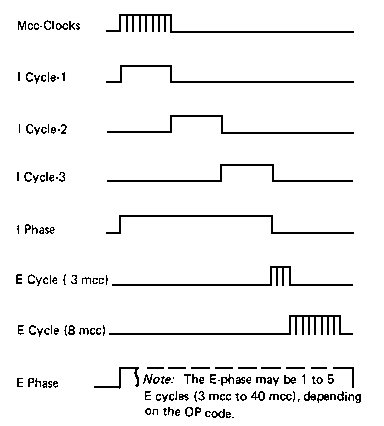
Flip Flop ေတြမွာ Counter အလုပ္လုပ္တာကို ျမင္ဖူးပါလိမ့္မယ္ ဒီေတာ့ အလုပ္ျမန္ျမန္လုပ္ေစခ်င္ရင္ Clock ကိုျမန္ျမန္ေပးရမွာေပါ့။ Processor ကိုလည္း အဲဒီလိုပဲယူဆလိုက္ပါ သူလည္းအတူတူပါပဲ Clock Trigger ျဖစ္မွပဲသူလည္း အလုပ္တစ္ခါ လုပ္ပါတယ္။ Processor ရဲ႕အလုပ္ကေတာ့ တစ္ျခား Device ေတြလိုမဟုတ္ပဲ အလုပ္ေတြက ဝင္လာတဲ့ Instruction အေပၚမတည္ၿပီးေတာ့ အလုပ္ကလုပ္ေပးရတာပါ။ Instruction မွာက အလြယ္ေျပာမယ္ဆိုရင္ အလုပ္ကတစ္ခုတည္း မဟုတ္ပါဘူး တစ္ခုထက္ပိုပါတယ္ အဲဒါေၾကာင့္ Clock တစ္ခုမွာ အလုပ္ကတစ္ခုပဲ လုပ္ႏိုင္တဲ့အတြက္ Single Instruction မွာဆိုရင္ Multiple Clock လိုအပ္တာပါ။
ေယဘုယ်အားျဖင့္ RISC Processor ေတြမွာ Instruction တစ္ခုအတြက္ လုပ္ရမယ့္အလုပ္ေတြကို ေအာက္မွာျပထားသလို အဆင့္နဲ႔ခြဲထားပါတယ္။
- Instruction Fetch (IF)
- Instruction Decode (ID)
- Execute (EX)
- Memory Access (MA)
- Write Back (WB)
အလုပ္တစ္ခုဟာ Clock တစ္ခုလုိအပ္တဲ့အတြက္ Instruction တစ္ခုအတြက္ အဆင့္ငါးဆင့္ လုပ္ရမွာျဖစ္လို႔ ပံုမွန္အားျဖင့္ Clock ငါးခုလိုအပ္ပါတယ္။ နမူနာအျဖစ္ အလုပ္လုပ္ပံုကို ေျပာရမယ္ဆိုရင္ 680x0 Instruction နမူနာတစ္ခုအျဖစ္ move.l (a1), d1 ဆိုတာ Memory တစ္ေနရာမွာ ရွိတယ္ဆိုၾကပါစို႔ အဲဒါဆိုရင္ ပထမအဆင့္ IF အေနနဲ႔ အဲဒီ့ Instruction ကို သက္ဆိုင္ရာေနရာကေန ဖတ္ပါတယ္ ဒုတိယအဆင့္ ID အေနနဲ႔ Instruction ကိုဘာလုပ္ခိုင္းသလဲ ခြဲျခားရပါတယ္ ခြဲျခားလိုက္မယ္ဆိုရင္ move လုပ္ရမယ္ လုပ္ရမယ့္ Size က Long ျဖစ္တယ္ a1 ထဲမွာရွိတဲ့ Address မွာသိမ္းထားတဲ့ data ကို d1 ဆိုတဲ့ Register ထဲကိုကူးထည့္ရမယ္လို႔ ခြဲျခားႏိုင္ပါတယ္။ တတိယအဆင့္ EX အေနနဲ႔ သူေျပာထားတဲ့အလုပ္ကို ALU အေနနဲ႔လုပ္ဖုိ႔လိုအပ္ပါတယ္ Execute လုပ္ဖို႔အတြက္ ဒီအတိုင္းလုပ္လို႔မရပါဘူး a1 ထဲမွာရွိတဲ့ Address မွာသိမ္းထားတဲ့ data ကိုဖတ္ဖို႔လိုတဲ့အတြက္ Processor ထဲက Data နဲ႔မလံုေလာက္လို႔ Memory ကို Access လုပ္ဖို႔လိုပါတယ္ အဲဒီ့လိုလုပ္တဲ့အလုပ္ကို စတုတၳအဆင့္အေနနဲ႔ MA လို႔ေျပာလို႔ရမွာျဖစ္ပါတယ္ ေနာက္ဆံုးအဆင့္အေနနဲ႔ ထြက္လာတဲ့အေျဖကို သက္ဆိုင္ရာ ေနရာမွာသြားေရးရပါတယ္ ဒီ Instruction မွာေတာ့ ဖတ္လို႔ရတဲ့ Data ကို d1 ထဲကိုသြားေရးပါတယ္ ဒါဆိုရင္ ပဥၥမအဆင့္ျဖစ္တဲ့ WB ၿပီးဆံုးပါလိမ့္မယ္။ အဲဒါဆိုရင္ေနာက္ထပ္ Instruction တစ္ခုကိုထပ္ဖတ္တဲ့ IF ကေန WB အထိဆက္လုပ္ရင္ Processor ကိုမပိတ္မခ်င္း ဆက္လုပ္ေနမွာျဖစ္ပါတယ္။

အခုအခ်ိန္အထိ အလုပ္တစ္ခုဟာ Clock အျဖစ္သာ အလုပ္လုပ္ေနတယ္လို႔ ယူဆေနတာပါ အဲဒီ့လိုဆိုရင္အလြန္ပဲေႏွးပါလိမ့္မယ္ ေနာက္ၿပီးေတာ့ Processor ရဲ႕အစိတ္အပိုင္းေတြဟာ အလုပ္အျပည့္အဝ အလုပ္ႏိုင္ပါဘူး။ ပံုမွန္အားျဖင့္ IF ဟာ တစ္ႀကိမ္အလုပ္လုပ္ၿပီးရင္ ေနာက္ထပ္ IF မေရာက္မခ်င္း Clock ေလးခု အားေနပါတယ္ အဲဒီ့ေတာ့ အစိတ္အပိုင္း ၅ ခုလံုးသာ တစ္ၿပိဳင္တည္း အလုပ္လုပ္ႏိုင္ရင္ လက္ဆင့္ကမ္းအလုပ္လုပ္သလို အၿပိဳင္အလုပ္လုပ္ႏိုင္ပါတယ္။ ဥပမာအားျဖင့္ IF အလုပ္ၿပီးလို႔ ID ကိုအလုပ္ကို လက္ဆင့္ကမ္းလုိက္ၿပီးရင္ IF အေနနဲ႔ ေနာက္ထပ္ Instruction တစ္ခုကိုယူၿပီးေတာ့ IF အလုပ္ထပ္လုပ္လို႔ရပါတယ္ အဲဒါဆိုရင္ အလုပ္စစခ်င္း Clock ေလးခုကလြဲရင္ ေနာက္အႀကိမ္ေတြမွာ Clock တစ္ခုမွာ Instruction တစ္ခုေပးႏိုင္ပါလိမ့္မယ္။ အဲဒါမ်ိဳးအလုပ္လုပ္တာကို Pipelining လို႔ေခၚပါတယ္။ ေအာက္ကပံုမွာၾကည့္ပါ

အေပၚမွာျပထားသလိုဆိုရင္ အလုပ္ေတြက Clock တစ္ခုမွာ Instruction တစ္ခုေတာ့ ၿပီးေအာင္လုပ္ႏိုင္သြားပါတယ္ အရင္လို Clock ေတြအမ်ားႀကီးမလိုေတာ့ဘူးေပါ့။ ေနာက္တစ္ဆင့္အေနနဲ႔ Clock တစ္ခုမွာ Multiple Instruction ဘယ္လိုလုပ္မလဲဆိုတာ စဥ္းစားရျပန္တယ္။ အယူအဆအားျဖင့္ ရွင္းလင္းပါတယ္ Pipeline တစ္ခုဟာ Single clock per instruction လုပ္ေပးႏိုင္ရင္ Multiple Pipeline ဆိုရင္ Single clock per multiple instruction အလုပ္လုပ္ႏိုင္ပါလိမ့္မယ္ အဲဒါမ်ိဳးကို Superscalar လို႔ေခၚပါတယ္။ ေအာက္မွာျပထားတဲ့ Figure ကိုၾကည့္ပါ Double Pipeline ျဖစ္တဲ့အတြက္ Single clock per double instruction အလုပ္လုပ္ေနတာ ေတြ႔ရပါလိမ့္မယ္။

 | | ||||||||||
| |||||||||||
 - In a computer, the clock cycle is the time between two adjacent pulses of the
ကိုလူပ်ိဳၾကီး ႏွင့္ အျခားရပ္ျခားဆိုဒ္မ်ားမွ မွီျငမ္းသည္...
Labels: A+, Computer-IV, Knowledges-II
KKZ Myanmar Unicode Keyboard


MoneTineKeyboard

Like လုပ်ထားနိုင်ပါတယ်

Labels
ဧည့်သည်တော်များခင်ဗျာ
- အခုဖတ်မည့် Post သည် လိင်မှု ပိုင်းဆိုင် ရာများ ကိုရေးသားထားခြင်းဖြစ်ပါသည်......
- သို့သော်ကျွန်တော်တို့ ရေးသား တင်ပြထားရခြင်းသည် ကျန်းမာရေး အတွက် သိထားနားလည် ထားသင့်သည် ဟုယူဆသော်ကြောင့်ဖြစ်ပါသည်.......
- ကျွန်တော်တို့၏ ဆောင်ပုဒ်သည်"ဘယ်အရာမဆို အားလုံးကို လုံးဝမတတ်ရင်နေ သိထား နားလည် ထားနိုင်ရင် ပိုကောင်းတယ်.." ဟု ဖြစ်ပါသည်..

ဧည့်သည်တော်များခင်ဗျာ
- အခုဖတ်မည့် Post သည် လိင်မှု ပိုင်းဆိုင် ရာများ ကိုရေးသားထားခြင်းဖြစ်ပါသည်......
- သို့သော်ကျွန်တော်တို့ ရေးသား တင်ပြထားရခြင်းသည် ကျန်းမာရေး အတွက် သိထားနားလည် ထားသင့်သည် ဟုယူဆသော်ကြောင့်ဖြစ်ပါသည်.......
- ကျွန်တော်တို့၏ ဆောင်ပုဒ်သည်"ဘယ်အရာမဆို အားလုံးကို လုံးဝမတတ်ရင်နေ သိထား နားလည် ထားနိုင်ရင် ပိုကောင်းတယ်.." ဟု ဖြစ်ပါသည်..
ဧည့်သည်တော်များခင်ဗျာ
- အခုဖတ်မည့် Post သည် လိင်မှု ပိုင်းဆိုင် ရာများ ကိုရေးသားထားခြင်းဖြစ်ပါသည်......
- သို့သော်ကျွန်တော်တို့ ရေးသား တင်ပြထားရခြင်းသည် ကျန်းမာရေး အတွက် သိထားနားလည် ထားသင့်သည် ဟုယူဆသော်ကြောင့်ဖြစ်ပါသည်.......
- ကျွန်တော်တို့၏ ဆောင်ပုဒ်သည်"ဘယ်အရာမဆို အားလုံးကို လုံးဝမတတ်ရင်နေ သိထား နားလည် ထားနိုင်ရင် ပိုကောင်းတယ်.." ဟု ဖြစ်ပါသည်..
ဧည့်သည်တော်များခင်ဗျာ
- အခုဖတ်မည့် Post သည် လိင်မှု ပိုင်းဆိုင် ရာများ ကိုရေးသားထားခြင်းဖြစ်ပါသည်......
- သို့သော်ကျွန်တော်တို့ ရေးသား တင်ပြထားရခြင်းသည် ကျန်းမာရေး အတွက် သိထားနားလည် ထားသင့်သည် ဟုယူဆသော်ကြောင့်ဖြစ်ပါသည်.......
- ကျွန်တော်တို့၏ ဆောင်ပုဒ်သည်"ဘယ်အရာမဆို အားလုံးကို လုံးဝမတတ်ရင်နေ သိထား နားလည် ထားနိုင်ရင် ပိုကောင်းတယ်.." ဟု ဖြစ်ပါသည်..
ဧည့်သည်တော်များခင်ဗျာ
- အခုဖတ်မည့် Post သည် လိင်မှု ပိုင်းဆိုင် ရာများ ကိုရေးသားထားခြင်းဖြစ်ပါသည်......
- သို့သော်ကျွန်တော်တို့ ရေးသား တင်ပြထားရခြင်းသည် ကျန်းမာရေး အတွက် သိထားနားလည် ထားသင့်သည် ဟုယူဆသော်ကြောင့်ဖြစ်ပါသည်.......
- ကျွန်တော်တို့၏ ဆောင်ပုဒ်သည်"ဘယ်အရာမဆို အားလုံးကို လုံးဝမတတ်ရင်နေ သိထား နားလည် ထားနိုင်ရင် ပိုကောင်းတယ်.." ဟု ဖြစ်ပါသည်..
ဧည့်သည်တော်များခင်ဗျာ
- အခုဖတ်မည့် Post သည် လိင်မှု ပိုင်းဆိုင် ရာများ ကိုရေးသားထားခြင်းဖြစ်ပါသည်......
- သို့သော်ကျွန်တော်တို့ ရေးသား တင်ပြထားရခြင်းသည် ကျန်းမာရေး အတွက် သိထားနားလည် ထားသင့်သည် ဟုယူဆသော်ကြောင့်ဖြစ်ပါသည်.......
- ကျွန်တော်တို့၏ ဆောင်ပုဒ်သည်"ဘယ်အရာမဆို အားလုံးကို လုံးဝမတတ်ရင်နေ သိထား နားလည် ထားနိုင်ရင် ပိုကောင်းတယ်.." ဟု ဖြစ်ပါသည်..
ဧည့်သည်တော်များခင်ဗျာ
- အခုဖတ်မည့် Post သည် လိင်မှု ပိုင်းဆိုင် ရာများ ကိုရေးသားထားခြင်းဖြစ်ပါသည်......
- သို့သော်ကျွန်တော်တို့ ရေးသား တင်ပြထားရခြင်းသည် ကျန်းမာရေး အတွက် သိထားနားလည် ထားသင့်သည် ဟုယူဆသော်ကြောင့်ဖြစ်ပါသည်.......
- ကျွန်တော်တို့၏ ဆောင်ပုဒ်သည်"ဘယ်အရာမဆို အားလုံးကို လုံးဝမတတ်ရင်နေ သိထား နားလည် ထားနိုင်ရင် ပိုကောင်းတယ်.." ဟု ဖြစ်ပါသည်..
ဧည့်သည်တော်များခင်ဗျာ
- အခုဖတ်မည့် Post သည် လိင်မှု ပိုင်းဆိုင် ရာများ ကိုရေးသားထားခြင်းဖြစ်ပါသည်......
- သို့သော်ကျွန်တော်တို့ ရေးသား တင်ပြထားရခြင်းသည် ကျန်းမာရေး အတွက် သိထားနားလည် ထားသင့်သည် ဟုယူဆသော်ကြောင့်ဖြစ်ပါသည်.......
- ကျွန်တော်တို့၏ ဆောင်ပုဒ်သည်"ဘယ်အရာမဆို အားလုံးကို လုံးဝမတတ်ရင်နေ သိထား နားလည် ထားနိုင်ရင် ပိုကောင်းတယ်.." ဟု ဖြစ်ပါသည်..
ဧည့်သည်တော်များခင်ဗျာ
- အခုဖတ်မည့် Post သည် လိင်မှု ပိုင်းဆိုင် ရာများ ကိုရေးသားထားခြင်းဖြစ်ပါသည်......
- သို့သော်ကျွန်တော်တို့ ရေးသား တင်ပြထားရခြင်းသည် ကျန်းမာရေး အတွက် သိထားနားလည် ထားသင့်သည် ဟုယူဆသော်ကြောင့်ဖြစ်ပါသည်.......
- ကျွန်တော်တို့၏ ဆောင်ပုဒ်သည်"ဘယ်အရာမဆို အားလုံးကို လုံးဝမတတ်ရင်နေ သိထား နားလည် ထားနိုင်ရင် ပိုကောင်းတယ်.." ဟု ဖြစ်ပါသည်..
ဧည့်သည်တော်များခင်ဗျာ
- အခုဖတ်မည့် Post သည် လိင်မှု ပိုင်းဆိုင် ရာများ ကိုရေးသားထားခြင်းဖြစ်ပါသည်......
- သို့သော်ကျွန်တော်တို့ ရေးသား တင်ပြထားရခြင်းသည် ကျန်းမာရေး အတွက် သိထားနားလည် ထားသင့်သည် ဟုယူဆသော်ကြောင့်ဖြစ်ပါသည်.......
- ကျွန်တော်တို့၏ ဆောင်ပုဒ်သည်"ဘယ်အရာမဆို အားလုံးကို လုံးဝမတတ်ရင်နေ သိထား နားလည် ထားနိုင်ရင် ပိုကောင်းတယ်.." ဟု ဖြစ်ပါသည်..
ဧည့်သည်တော်များခင်ဗျာ
- အခုဖတ်မည့် Post သည် လိင်မှု ပိုင်းဆိုင် ရာများ ကိုရေးသားထားခြင်းဖြစ်ပါသည်......
- သို့သော်ကျွန်တော်တို့ ရေးသား တင်ပြထားရခြင်းသည် ကျန်းမာရေး အတွက် သိထားနားလည် ထားသင့်သည် ဟုယူဆသော်ကြောင့်ဖြစ်ပါသည်.......
- ကျွန်တော်တို့၏ ဆောင်ပုဒ်သည်"ဘယ်အရာမဆို အားလုံးကို လုံးဝမတတ်ရင်နေ သိထား နားလည် ထားနိုင်ရင် ပိုကောင်းတယ်.." ဟု ဖြစ်ပါသည်..
ဧည့်သည်တော်များခင်ဗျာ
- အခုဖတ်မည့် Post သည် လိင်မှု ပိုင်းဆိုင် ရာများ ကိုရေးသားထားခြင်းဖြစ်ပါသည်......
- သို့သော်ကျွန်တော်တို့ ရေးသား တင်ပြထားရခြင်းသည် ကျန်းမာရေး အတွက် သိထားနားလည် ထားသင့်သည် ဟုယူဆသော်ကြောင့်ဖြစ်ပါသည်.......
- ကျွန်တော်တို့၏ ဆောင်ပုဒ်သည်"ဘယ်အရာမဆို အားလုံးကို လုံးဝမတတ်ရင်နေ သိထား နားလည် ထားနိုင်ရင် ပိုကောင်းတယ်.." ဟု ဖြစ်ပါသည်..
ဧည့်သည်တော်များခင်ဗျာ
- အခုဖတ်မည့် Post သည် လိင်မှု ပိုင်းဆိုင် ရာများ ကိုရေးသားထားခြင်းဖြစ်ပါသည်......
- သို့သော်ကျွန်တော်တို့ ရေးသား တင်ပြထားရခြင်းသည် ကျန်းမာရေး အတွက် သိထားနားလည် ထားသင့်သည် ဟုယူဆသော်ကြောင့်ဖြစ်ပါသည်.......
- ကျွန်တော်တို့၏ ဆောင်ပုဒ်သည်"ဘယ်အရာမဆို အားလုံးကို လုံးဝမတတ်ရင်နေ သိထား နားလည် ထားနိုင်ရင် ပိုကောင်းတယ်.." ဟု ဖြစ်ပါသည်..
ဧည့်သည်တော်များခင်ဗျာ
- အခုဖတ်မည့် Post သည် လိင်မှု ပိုင်းဆိုင် ရာများ ကိုရေးသားထားခြင်းဖြစ်ပါသည်......
- သို့သော်ကျွန်တော်တို့ ရေးသား တင်ပြထားရခြင်းသည် ကျန်းမာရေး အတွက် သိထားနားလည် ထားသင့်သည် ဟုယူဆသော်ကြောင့်ဖြစ်ပါသည်.......
- ကျွန်တော်တို့၏ ဆောင်ပုဒ်သည်"ဘယ်အရာမဆို အားလုံးကို လုံးဝမတတ်ရင်နေ သိထား နားလည် ထားနိုင်ရင် ပိုကောင်းတယ်.." ဟု ဖြစ်ပါသည်..
ဧည့်သည်တော်များခင်ဗျာ
- အခုဖတ်မည့် Post သည် လိင်မှု ပိုင်းဆိုင် ရာများ ကိုရေးသားထားခြင်းဖြစ်ပါသည်......
- သို့သော်ကျွန်တော်တို့ ရေးသား တင်ပြထားရခြင်းသည် ကျန်းမာရေး အတွက် သိထားနားလည် ထားသင့်သည် ဟုယူဆသော်ကြောင့်ဖြစ်ပါသည်.......
- ကျွန်တော်တို့၏ ဆောင်ပုဒ်သည်"ဘယ်အရာမဆို အားလုံးကို လုံးဝမတတ်ရင်နေ သိထား နားလည် ထားနိုင်ရင် ပိုကောင်းတယ်.." ဟု ဖြစ်ပါသည်..
ဧည့်သည်တော်များခင်ဗျာ
- အခုဖတ်မည့် Post သည် လိင်မှု ပိုင်းဆိုင် ရာများ ကိုရေးသားထားခြင်းဖြစ်ပါသည်......
- သို့သော်ကျွန်တော်တို့ ရေးသား တင်ပြထားရခြင်းသည် ကျန်းမာရေး အတွက် သိထားနားလည် ထားသင့်သည် ဟုယူဆသော်ကြောင့်ဖြစ်ပါသည်.......
- ကျွန်တော်တို့၏ ဆောင်ပုဒ်သည်"ဘယ်အရာမဆို အားလုံးကို လုံးဝမတတ်ရင်နေ သိထား နားလည် ထားနိုင်ရင် ပိုကောင်းတယ်.." ဟု ဖြစ်ပါသည်..
ဧည့်သည်တော်များခင်ဗျာ
- အခုဖတ်မည့် Post သည် လိင်မှု ပိုင်းဆိုင် ရာများ ကိုရေးသားထားခြင်းဖြစ်ပါသည်......
- သို့သော်ကျွန်တော်တို့ ရေးသား တင်ပြထားရခြင်းသည် ကျန်းမာရေး အတွက် သိထားနားလည် ထားသင့်သည် ဟုယူဆသော်ကြောင့်ဖြစ်ပါသည်.......
- ကျွန်တော်တို့၏ ဆောင်ပုဒ်သည်"ဘယ်အရာမဆို အားလုံးကို လုံးဝမတတ်ရင်နေ သိထား နားလည် ထားနိုင်ရင် ပိုကောင်းတယ်.." ဟု ဖြစ်ပါသည်..
ဧည့်သည်တော်များခင်ဗျာ
- အခုဖတ်မည့် Post သည် လိင်မှု ပိုင်းဆိုင် ရာများ ကိုရေးသားထားခြင်းဖြစ်ပါသည်......
- သို့သော်ကျွန်တော်တို့ ရေးသား တင်ပြထားရခြင်းသည် ကျန်းမာရေး အတွက် သိထားနားလည် ထားသင့်သည် ဟုယူဆသော်ကြောင့်ဖြစ်ပါသည်.......
- ကျွန်တော်တို့၏ ဆောင်ပုဒ်သည်"ဘယ်အရာမဆို အားလုံးကို လုံးဝမတတ်ရင်နေ သိထား နားလည် ထားနိုင်ရင် ပိုကောင်းတယ်.." ဟု ဖြစ်ပါသည်..
ဧည့်သည်တော်များခင်ဗျာ
- အခုဖတ်မည့် Post သည် လိင်မှု ပိုင်းဆိုင် ရာများ ကိုရေးသားထားခြင်းဖြစ်ပါသည်......
- သို့သော်ကျွန်တော်တို့ ရေးသား တင်ပြထားရခြင်းသည် ကျန်းမာရေး အတွက် သိထားနားလည် ထားသင့်သည် ဟုယူဆသော်ကြောင့်ဖြစ်ပါသည်.......
- ကျွန်တော်တို့၏ ဆောင်ပုဒ်သည်"ဘယ်အရာမဆို အားလုံးကို လုံးဝမတတ်ရင်နေ သိထား နားလည် ထားနိုင်ရင် ပိုကောင်းတယ်.." ဟု ဖြစ်ပါသည်..
ဧည့်သည်တော်များခင်ဗျာ
- အခုဖတ်မည့် Post သည် လိင်မှု ပိုင်းဆိုင် ရာများ ကိုရေးသားထားခြင်းဖြစ်ပါသည်......
- သို့သော်ကျွန်တော်တို့ ရေးသား တင်ပြထားရခြင်းသည် ကျန်းမာရေး အတွက် သိထားနားလည် ထားသင့်သည် ဟုယူဆသော်ကြောင့်ဖြစ်ပါသည်.......
- ကျွန်တော်တို့၏ ဆောင်ပုဒ်သည်"ဘယ်အရာမဆို အားလုံးကို လုံးဝမတတ်ရင်နေ သိထား နားလည် ထားနိုင်ရင် ပိုကောင်းတယ်.." ဟု ဖြစ်ပါသည်..
ဧည့်သည်တော်များခင်ဗျာ
- အခုဖတ်မည့် Post သည် လိင်မှု ပိုင်းဆိုင် ရာများ ကိုရေးသားထားခြင်းဖြစ်ပါသည်......
- သို့သော်ကျွန်တော်တို့ ရေးသား တင်ပြထားရခြင်းသည် ကျန်းမာရေး အတွက် သိထားနားလည် ထားသင့်သည် ဟုယူဆသော်ကြောင့်ဖြစ်ပါသည်.......
- ကျွန်တော်တို့၏ ဆောင်ပုဒ်သည်"ဘယ်အရာမဆို အားလုံးကို လုံးဝမတတ်ရင်နေ သိထား နားလည် ထားနိုင်ရင် ပိုကောင်းတယ်.." ဟု ဖြစ်ပါသည်..
ဧည့်သည်တော်များခင်ဗျာ
- အခုဖတ်မည့် Post သည် လိင်မှု ပိုင်းဆိုင် ရာများ ကိုရေးသားထားခြင်းဖြစ်ပါသည်......
- သို့သော်ကျွန်တော်တို့ ရေးသား တင်ပြထားရခြင်းသည် ကျန်းမာရေး အတွက် သိထားနားလည် ထားသင့်သည် ဟုယူဆသော်ကြောင့်ဖြစ်ပါသည်.......
- ကျွန်တော်တို့၏ ဆောင်ပုဒ်သည်"ဘယ်အရာမဆို အားလုံးကို လုံးဝမတတ်ရင်နေ သိထား နားလည် ထားနိုင်ရင် ပိုကောင်းတယ်.." ဟု ဖြစ်ပါသည်..
ဧည့်သည်တော်များခင်ဗျာ
- အခုဖတ်မည့် Post သည် လိင်မှု ပိုင်းဆိုင် ရာများ ကိုရေးသားထားခြင်းဖြစ်ပါသည်......
- သို့သော်ကျွန်တော်တို့ ရေးသား တင်ပြထားရခြင်းသည် ကျန်းမာရေး အတွက် သိထားနားလည် ထားသင့်သည် ဟုယူဆသော်ကြောင့်ဖြစ်ပါသည်.......
- ကျွန်တော်တို့၏ ဆောင်ပုဒ်သည်"ဘယ်အရာမဆို အားလုံးကို လုံးဝမတတ်ရင်နေ သိထား နားလည် ထားနိုင်ရင် ပိုကောင်းတယ်.." ဟု ဖြစ်ပါသည်..
ဧည့်သည်တော်များခင်ဗျာ
- အခုဖတ်မည့် Post သည် လိင်မှု ပိုင်းဆိုင် ရာများ ကိုရေးသားထားခြင်းဖြစ်ပါသည်......
- သို့သော်ကျွန်တော်တို့ ရေးသား တင်ပြထားရခြင်းသည် ကျန်းမာရေး အတွက် သိထားနားလည် ထားသင့်သည် ဟုယူဆသော်ကြောင့်ဖြစ်ပါသည်.......
- ကျွန်တော်တို့၏ ဆောင်ပုဒ်သည်"ဘယ်အရာမဆို အားလုံးကို လုံးဝမတတ်ရင်နေ သိထား နားလည် ထားနိုင်ရင် ပိုကောင်းတယ်.." ဟု ဖြစ်ပါသည်..
ဧည့်သည်တော်များခင်ဗျာ
- အခုဖတ်မည့် Post သည် လိင်မှု ပိုင်းဆိုင် ရာများ ကိုရေးသားထားခြင်းဖြစ်ပါသည်......
- သို့သော်ကျွန်တော်တို့ ရေးသား တင်ပြထားရခြင်းသည် ကျန်းမာရေး အတွက် သိထားနားလည် ထားသင့်သည် ဟုယူဆသော်ကြောင့်ဖြစ်ပါသည်.......
- ကျွန်တော်တို့၏ ဆောင်ပုဒ်သည်"ဘယ်အရာမဆို အားလုံးကို လုံးဝမတတ်ရင်နေ သိထား နားလည် ထားနိုင်ရင် ပိုကောင်းတယ်.." ဟု ဖြစ်ပါသည်..
ဧည့်သည်တော်များခင်ဗျာ
- အခုဖတ်မည့် Post သည် လိင်မှု ပိုင်းဆိုင် ရာများ ကိုရေးသားထားခြင်းဖြစ်ပါသည်......
- သို့သော်ကျွန်တော်တို့ ရေးသား တင်ပြထားရခြင်းသည် ကျန်းမာရေး အတွက် သိထားနားလည် ထားသင့်သည် ဟုယူဆသော်ကြောင့်ဖြစ်ပါသည်.......
- ကျွန်တော်တို့၏ ဆောင်ပုဒ်သည်"ဘယ်အရာမဆို အားလုံးကို လုံးဝမတတ်ရင်နေ သိထား နားလည် ထားနိုင်ရင် ပိုကောင်းတယ်.." ဟု ဖြစ်ပါသည်..
ဧည့်သည်တော်များခင်ဗျာ
- အခုဖတ်မည့် Post သည် လိင်မှု ပိုင်းဆိုင် ရာများ ကိုရေးသားထားခြင်းဖြစ်ပါသည်......
- သို့သော်ကျွန်တော်တို့ ရေးသား တင်ပြထားရခြင်းသည် ကျန်းမာရေး အတွက် သိထားနားလည် ထားသင့်သည် ဟုယူဆသော်ကြောင့်ဖြစ်ပါသည်.......
- ကျွန်တော်တို့၏ ဆောင်ပုဒ်သည်"ဘယ်အရာမဆို အားလုံးကို လုံးဝမတတ်ရင်နေ သိထား နားလည် ထားနိုင်ရင် ပိုကောင်းတယ်.." ဟု ဖြစ်ပါသည်..
ဧည့်သည်တော်များခင်ဗျာ
- အခုဖတ်မည့် Post သည် လိင်မှု ပိုင်းဆိုင် ရာများ ကိုရေးသားထားခြင်းဖြစ်ပါသည်......
- သို့သော်ကျွန်တော်တို့ ရေးသား တင်ပြထားရခြင်းသည် ကျန်းမာရေး အတွက် သိထားနားလည် ထားသင့်သည် ဟုယူဆသော်ကြောင့်ဖြစ်ပါသည်.......
- ကျွန်တော်တို့၏ ဆောင်ပုဒ်သည်"ဘယ်အရာမဆို အားလုံးကို လုံးဝမတတ်ရင်နေ သိထား နားလည် ထားနိုင်ရင် ပိုကောင်းတယ်.." ဟု ဖြစ်ပါသည်..
ဧည့်သည်တော်များခင်ဗျာ
- အခုဖတ်မည့် Post သည် လိင်မှု ပိုင်းဆိုင် ရာများ ကိုရေးသားထားခြင်းဖြစ်ပါသည်......
- သို့သော်ကျွန်တော်တို့ ရေးသား တင်ပြထားရခြင်းသည် ကျန်းမာရေး အတွက် သိထားနားလည် ထားသင့်သည် ဟုယူဆသော်ကြောင့်ဖြစ်ပါသည်.......
- ကျွန်တော်တို့၏ ဆောင်ပုဒ်သည်"ဘယ်အရာမဆို အားလုံးကို လုံးဝမတတ်ရင်နေ သိထား နားလည် ထားနိုင်ရင် ပိုကောင်းတယ်.." ဟု ဖြစ်ပါသည်..
ဧည့်သည်တော်များခင်ဗျာ
- အခုဖတ်မည့် Post သည် လိင်မှု ပိုင်းဆိုင် ရာများ ကိုရေးသားထားခြင်းဖြစ်ပါသည်......
- သို့သော်ကျွန်တော်တို့ ရေးသား တင်ပြထားရခြင်းသည် ကျန်းမာရေး အတွက် သိထားနားလည် ထားသင့်သည် ဟုယူဆသော်ကြောင့်ဖြစ်ပါသည်.......
- ကျွန်တော်တို့၏ ဆောင်ပုဒ်သည်"ဘယ်အရာမဆို အားလုံးကို လုံးဝမတတ်ရင်နေ သိထား နားလည် ထားနိုင်ရင် ပိုကောင်းတယ်.." ဟု ဖြစ်ပါသည်..
ဧည့်သည်တော်များခင်ဗျာ
- အခုဖတ်မည့် Post သည် လိင်မှု ပိုင်းဆိုင် ရာများ ကိုရေးသားထားခြင်းဖြစ်ပါသည်......
- သို့သော်ကျွန်တော်တို့ ရေးသား တင်ပြထားရခြင်းသည် ကျန်းမာရေး အတွက် သိထားနားလည် ထားသင့်သည် ဟုယူဆသော်ကြောင့်ဖြစ်ပါသည်.......
- ကျွန်တော်တို့၏ ဆောင်ပုဒ်သည်"ဘယ်အရာမဆို အားလုံးကို လုံးဝမတတ်ရင်နေ သိထား နားလည် ထားနိုင်ရင် ပိုကောင်းတယ်.." ဟု ဖြစ်ပါသည်..
ဧည့်သည်တော်များခင်ဗျာ
- အခုဖတ်မည့် Post သည် လိင်မှု ပိုင်းဆိုင် ရာများ ကိုရေးသားထားခြင်းဖြစ်ပါသည်......
- သို့သော်ကျွန်တော်တို့ ရေးသား တင်ပြထားရခြင်းသည် ကျန်းမာရေး အတွက် သိထားနားလည် ထားသင့်သည် ဟုယူဆသော်ကြောင့်ဖြစ်ပါသည်.......
- ကျွန်တော်တို့၏ ဆောင်ပုဒ်သည်"ဘယ်အရာမဆို အားလုံးကို လုံးဝမတတ်ရင်နေ သိထား နားလည် ထားနိုင်ရင် ပိုကောင်းတယ်.." ဟု ဖြစ်ပါသည်..
ဧည့်သည်တော်များခင်ဗျာ
- အခုဖတ်မည့် Post သည် လိင်မှု ပိုင်းဆိုင် ရာများ ကိုရေးသားထားခြင်းဖြစ်ပါသည်......
- သို့သော်ကျွန်တော်တို့ ရေးသား တင်ပြထားရခြင်းသည် ကျန်းမာရေး အတွက် သိထားနားလည် ထားသင့်သည် ဟုယူဆသော်ကြောင့်ဖြစ်ပါသည်.......
- ကျွန်တော်တို့၏ ဆောင်ပုဒ်သည်"ဘယ်အရာမဆို အားလုံးကို လုံးဝမတတ်ရင်နေ သိထား နားလည် ထားနိုင်ရင် ပိုကောင်းတယ်.." ဟု ဖြစ်ပါသည်..
ဧည့်သည်တော်များခင်ဗျာ
- အခုဖတ်မည့် Post သည် လိင်မှု ပိုင်းဆိုင် ရာများ ကိုရေးသားထားခြင်းဖြစ်ပါသည်......
- သို့သော်ကျွန်တော်တို့ ရေးသား တင်ပြထားရခြင်းသည် ကျန်းမာရေး အတွက် သိထားနားလည် ထားသင့်သည် ဟုယူဆသော်ကြောင့်ဖြစ်ပါသည်.......
- ကျွန်တော်တို့၏ ဆောင်ပုဒ်သည်"ဘယ်အရာမဆို အားလုံးကို လုံးဝမတတ်ရင်နေ သိထား နားလည် ထားနိုင်ရင် ပိုကောင်းတယ်.." ဟု ဖြစ်ပါသည်..
ဧည့်သည်တော်များခင်ဗျာ
- အခုဖတ်မည့် Post သည် လိင်မှု ပိုင်းဆိုင် ရာများ ကိုရေးသားထားခြင်းဖြစ်ပါသည်......
- သို့သော်ကျွန်တော်တို့ ရေးသား တင်ပြထားရခြင်းသည် ကျန်းမာရေး အတွက် သိထားနားလည် ထားသင့်သည် ဟုယူဆသော်ကြောင့်ဖြစ်ပါသည်.......
- ကျွန်တော်တို့၏ ဆောင်ပုဒ်သည်"ဘယ်အရာမဆို အားလုံးကို လုံးဝမတတ်ရင်နေ သိထား နားလည် ထားနိုင်ရင် ပိုကောင်းတယ်.." ဟု ဖြစ်ပါသည်..
ဧည့်သည်တော်များခင်ဗျာ
- အခုဖတ်မည့် Post သည် လိင်မှု ပိုင်းဆိုင် ရာများ ကိုရေးသားထားခြင်းဖြစ်ပါသည်......
- သို့သော်ကျွန်တော်တို့ ရေးသား တင်ပြထားရခြင်းသည် ကျန်းမာရေး အတွက် သိထားနားလည် ထားသင့်သည် ဟုယူဆသော်ကြောင့်ဖြစ်ပါသည်.......
- ကျွန်တော်တို့၏ ဆောင်ပုဒ်သည်"ဘယ်အရာမဆို အားလုံးကို လုံးဝမတတ်ရင်နေ သိထား နားလည် ထားနိုင်ရင် ပိုကောင်းတယ်.." ဟု ဖြစ်ပါသည်..
ဧည့်သည်တော်များခင်ဗျာ
- အခုဖတ်မည့် Post သည် လိင်မှု ပိုင်းဆိုင် ရာများ ကိုရေးသားထားခြင်းဖြစ်ပါသည်......
- သို့သော်ကျွန်တော်တို့ ရေးသား တင်ပြထားရခြင်းသည် ကျန်းမာရေး အတွက် သိထားနားလည် ထားသင့်သည် ဟုယူဆသော်ကြောင့်ဖြစ်ပါသည်.......
- ကျွန်တော်တို့၏ ဆောင်ပုဒ်သည်"ဘယ်အရာမဆို အားလုံးကို လုံးဝမတတ်ရင်နေ သိထား နားလည် ထားနိုင်ရင် ပိုကောင်းတယ်.." ဟု ဖြစ်ပါသည်..
ဧည့်သည်တော်များခင်ဗျာ
- အခုဖတ်မည့် Post သည် လိင်မှု ပိုင်းဆိုင် ရာများ ကိုရေးသားထားခြင်းဖြစ်ပါသည်......
- သို့သော်ကျွန်တော်တို့ ရေးသား တင်ပြထားရခြင်းသည် ကျန်းမာရေး အတွက် သိထားနားလည် ထားသင့်သည် ဟုယူဆသော်ကြောင့်ဖြစ်ပါသည်.......
- ကျွန်တော်တို့၏ ဆောင်ပုဒ်သည်"ဘယ်အရာမဆို အားလုံးကို လုံးဝမတတ်ရင်နေ သိထား နားလည် ထားနိုင်ရင် ပိုကောင်းတယ်.." ဟု ဖြစ်ပါသည်..
ဧည့်သည်တော်များခင်ဗျာ
- အခုဖတ်မည့် Post သည် လိင်မှု ပိုင်းဆိုင် ရာများ ကိုရေးသားထားခြင်းဖြစ်ပါသည်......
- သို့သော်ကျွန်တော်တို့ ရေးသား တင်ပြထားရခြင်းသည် ကျန်းမာရေး အတွက် သိထားနားလည် ထားသင့်သည် ဟုယူဆသော်ကြောင့်ဖြစ်ပါသည်.......
- ကျွန်တော်တို့၏ ဆောင်ပုဒ်သည်"ဘယ်အရာမဆို အားလုံးကို လုံးဝမတတ်ရင်နေ သိထား နားလည် ထားနိုင်ရင် ပိုကောင်းတယ်.." ဟု ဖြစ်ပါသည်..
ဧည့်သည်တော်များခင်ဗျာ
- အခုဖတ်မည့် Post သည် လိင်မှု ပိုင်းဆိုင် ရာများ ကိုရေးသားထားခြင်းဖြစ်ပါသည်......
- သို့သော်ကျွန်တော်တို့ ရေးသား တင်ပြထားရခြင်းသည် ကျန်းမာရေး အတွက် သိထားနားလည် ထားသင့်သည် ဟုယူဆသော်ကြောင့်ဖြစ်ပါသည်.......
- ကျွန်တော်တို့၏ ဆောင်ပုဒ်သည်"ဘယ်အရာမဆို အားလုံးကို လုံးဝမတတ်ရင်နေ သိထား နားလည် ထားနိုင်ရင် ပိုကောင်းတယ်.." ဟု ဖြစ်ပါသည်..
ဧည့်သည်တော်များခင်ဗျာ
- အခုဖတ်မည့် Post သည် လိင်မှု ပိုင်းဆိုင် ရာများ ကိုရေးသားထားခြင်းဖြစ်ပါသည်......
- သို့သော်ကျွန်တော်တို့ ရေးသား တင်ပြထားရခြင်းသည် ကျန်းမာရေး အတွက် သိထားနားလည် ထားသင့်သည် ဟုယူဆသော်ကြောင့်ဖြစ်ပါသည်.......
- ကျွန်တော်တို့၏ ဆောင်ပုဒ်သည်"ဘယ်အရာမဆို အားလုံးကို လုံးဝမတတ်ရင်နေ သိထား နားလည် ထားနိုင်ရင် ပိုကောင်းတယ်.." ဟု ဖြစ်ပါသည်..
ဧည့်သည်တော်များခင်ဗျာ
- အခုဖတ်မည့် Post သည် လိင်မှု ပိုင်းဆိုင် ရာများ ကိုရေးသားထားခြင်းဖြစ်ပါသည်......
- သို့သော်ကျွန်တော်တို့ ရေးသား တင်ပြထားရခြင်းသည် ကျန်းမာရေး အတွက် သိထားနားလည် ထားသင့်သည် ဟုယူဆသော်ကြောင့်ဖြစ်ပါသည်.......
- ကျွန်တော်တို့၏ ဆောင်ပုဒ်သည်"ဘယ်အရာမဆို အားလုံးကို လုံးဝမတတ်ရင်နေ သိထား နားလည် ထားနိုင်ရင် ပိုကောင်းတယ်.." ဟု ဖြစ်ပါသည်..
ဧည့်သည်တော်များခင်ဗျာ
- အခုဖတ်မည့် Post သည် လိင်မှု ပိုင်းဆိုင် ရာများ ကိုရေးသားထားခြင်းဖြစ်ပါသည်......
- သို့သော်ကျွန်တော်တို့ ရေးသား တင်ပြထားရခြင်းသည် ကျန်းမာရေး အတွက် သိထားနားလည် ထားသင့်သည် ဟုယူဆသော်ကြောင့်ဖြစ်ပါသည်.......
- ကျွန်တော်တို့၏ ဆောင်ပုဒ်သည်"ဘယ်အရာမဆို အားလုံးကို လုံးဝမတတ်ရင်နေ သိထား နားလည် ထားနိုင်ရင် ပိုကောင်းတယ်.." ဟု ဖြစ်ပါသည်..
ဧည့်သည်တော်များခင်ဗျာ
- အခုဖတ်မည့် Post သည် လိင်မှု ပိုင်းဆိုင် ရာများ ကိုရေးသားထားခြင်းဖြစ်ပါသည်......
- သို့သော်ကျွန်တော်တို့ ရေးသား တင်ပြထားရခြင်းသည် ကျန်းမာရေး အတွက် သိထားနားလည် ထားသင့်သည် ဟုယူဆသော်ကြောင့်ဖြစ်ပါသည်.......
- ကျွန်တော်တို့၏ ဆောင်ပုဒ်သည်"ဘယ်အရာမဆို အားလုံးကို လုံးဝမတတ်ရင်နေ သိထား နားလည် ထားနိုင်ရင် ပိုကောင်းတယ်.." ဟု ဖြစ်ပါသည်..
ဧည့်သည်တော်များခင်ဗျာ
- အခုဖတ်မည့် Post သည် လိင်မှု ပိုင်းဆိုင် ရာများ ကိုရေးသားထားခြင်းဖြစ်ပါသည်......
- သို့သော်ကျွန်တော်တို့ ရေးသား တင်ပြထားရခြင်းသည် ကျန်းမာရေး အတွက် သိထားနားလည် ထားသင့်သည် ဟုယူဆသော်ကြောင့်ဖြစ်ပါသည်.......
- ကျွန်တော်တို့၏ ဆောင်ပုဒ်သည်"ဘယ်အရာမဆို အားလုံးကို လုံးဝမတတ်ရင်နေ သိထား နားလည် ထားနိုင်ရင် ပိုကောင်းတယ်.." ဟု ဖြစ်ပါသည်..
ဧည့်သည်တော်များခင်ဗျာ
- အခုဖတ်မည့် Post သည် လိင်မှု ပိုင်းဆိုင် ရာများ ကိုရေးသားထားခြင်းဖြစ်ပါသည်......
- သို့သော်ကျွန်တော်တို့ ရေးသား တင်ပြထားရခြင်းသည် ကျန်းမာရေး အတွက် သိထားနားလည် ထားသင့်သည် ဟုယူဆသော်ကြောင့်ဖြစ်ပါသည်.......
- ကျွန်တော်တို့၏ ဆောင်ပုဒ်သည်"ဘယ်အရာမဆို အားလုံးကို လုံးဝမတတ်ရင်နေ သိထား နားလည် ထားနိုင်ရင် ပိုကောင်းတယ်.." ဟု ဖြစ်ပါသည်..
ဧည့်သည်တော်များခင်ဗျာ
- အခုဖတ်မည့် Post သည် လိင်မှု ပိုင်းဆိုင် ရာများ ကိုရေးသားထားခြင်းဖြစ်ပါသည်......
- သို့သော်ကျွန်တော်တို့ ရေးသား တင်ပြထားရခြင်းသည် ကျန်းမာရေး အတွက် သိထားနားလည် ထားသင့်သည် ဟုယူဆသော်ကြောင့်ဖြစ်ပါသည်.......
- ကျွန်တော်တို့၏ ဆောင်ပုဒ်သည်"ဘယ်အရာမဆို အားလုံးကို လုံးဝမတတ်ရင်နေ သိထား နားလည် ထားနိုင်ရင် ပိုကောင်းတယ်.." ဟု ဖြစ်ပါသည်..
ဧည့်သည်တော်များခင်ဗျာ
- အခုဖတ်မည့် Post သည် လိင်မှု ပိုင်းဆိုင် ရာများ ကိုရေးသားထားခြင်းဖြစ်ပါသည်......
- သို့သော်ကျွန်တော်တို့ ရေးသား တင်ပြထားရခြင်းသည် ကျန်းမာရေး အတွက် သိထားနားလည် ထားသင့်သည် ဟုယူဆသော်ကြောင့်ဖြစ်ပါသည်.......
- ကျွန်တော်တို့၏ ဆောင်ပုဒ်သည်"ဘယ်အရာမဆို အားလုံးကို လုံးဝမတတ်ရင်နေ သိထား နားလည် ထားနိုင်ရင် ပိုကောင်းတယ်.." ဟု ဖြစ်ပါသည်..
ဧည့်သည်တော်များခင်ဗျာ
- အခုဖတ်မည့် Post သည် လိင်မှု ပိုင်းဆိုင် ရာများ ကိုရေးသားထားခြင်းဖြစ်ပါသည်......
- သို့သော်ကျွန်တော်တို့ ရေးသား တင်ပြထားရခြင်းသည် ကျန်းမာရေး အတွက် သိထားနားလည် ထားသင့်သည် ဟုယူဆသော်ကြောင့်ဖြစ်ပါသည်.......
- ကျွန်တော်တို့၏ ဆောင်ပုဒ်သည်"ဘယ်အရာမဆို အားလုံးကို လုံးဝမတတ်ရင်နေ သိထား နားလည် ထားနိုင်ရင် ပိုကောင်းတယ်.." ဟု ဖြစ်ပါသည်..
ဧည့်သည်တော်များခင်ဗျာ
- အခုဖတ်မည့် Post သည် လိင်မှု ပိုင်းဆိုင် ရာများ ကိုရေးသားထားခြင်းဖြစ်ပါသည်......
- သို့သော်ကျွန်တော်တို့ ရေးသား တင်ပြထားရခြင်းသည် ကျန်းမာရေး အတွက် သိထားနားလည် ထားသင့်သည် ဟုယူဆသော်ကြောင့်ဖြစ်ပါသည်.......
- ကျွန်တော်တို့၏ ဆောင်ပုဒ်သည်"ဘယ်အရာမဆို အားလုံးကို လုံးဝမတတ်ရင်နေ သိထား နားလည် ထားနိုင်ရင် ပိုကောင်းတယ်.." ဟု ဖြစ်ပါသည်..
ဧည့်သည်တော်များခင်ဗျာ
- အခုဖတ်မည့် Post သည် လိင်မှု ပိုင်းဆိုင် ရာများ ကိုရေးသားထားခြင်းဖြစ်ပါသည်......
- သို့သော်ကျွန်တော်တို့ ရေးသား တင်ပြထားရခြင်းသည် ကျန်းမာရေး အတွက် သိထားနားလည် ထားသင့်သည် ဟုယူဆသော်ကြောင့်ဖြစ်ပါသည်.......
- ကျွန်တော်တို့၏ ဆောင်ပုဒ်သည်"ဘယ်အရာမဆို အားလုံးကို လုံးဝမတတ်ရင်နေ သိထား နားလည် ထားနိုင်ရင် ပိုကောင်းတယ်.." ဟု ဖြစ်ပါသည်..
ဧည့်သည်တော်များခင်ဗျာ
- အခုဖတ်မည့် Post သည် လိင်မှု ပိုင်းဆိုင် ရာများ ကိုရေးသားထားခြင်းဖြစ်ပါသည်......
- သို့သော်ကျွန်တော်တို့ ရေးသား တင်ပြထားရခြင်းသည် ကျန်းမာရေး အတွက် သိထားနားလည် ထားသင့်သည် ဟုယူဆသော်ကြောင့်ဖြစ်ပါသည်.......
- ကျွန်တော်တို့၏ ဆောင်ပုဒ်သည်"ဘယ်အရာမဆို အားလုံးကို လုံးဝမတတ်ရင်နေ သိထား နားလည် ထားနိုင်ရင် ပိုကောင်းတယ်.." ဟု ဖြစ်ပါသည်..
ဧည့်သည်တော်များခင်ဗျာ
- အခုဖတ်မည့် Post သည် လိင်မှု ပိုင်းဆိုင် ရာများ ကိုရေးသားထားခြင်းဖြစ်ပါသည်......
- သို့သော်ကျွန်တော်တို့ ရေးသား တင်ပြထားရခြင်းသည် ကျန်းမာရေး အတွက် သိထားနားလည် ထားသင့်သည် ဟုယူဆသော်ကြောင့်ဖြစ်ပါသည်.......
- ကျွန်တော်တို့၏ ဆောင်ပုဒ်သည်"ဘယ်အရာမဆို အားလုံးကို လုံးဝမတတ်ရင်နေ သိထား နားလည် ထားနိုင်ရင် ပိုကောင်းတယ်.." ဟု ဖြစ်ပါသည်..
ဧည့်သည်တော်များခင်ဗျာ
- အခုဖတ်မည့် Post သည် လိင်မှု ပိုင်းဆိုင် ရာများ ကိုရေးသားထားခြင်းဖြစ်ပါသည်......
- သို့သော်ကျွန်တော်တို့ ရေးသား တင်ပြထားရခြင်းသည် ကျန်းမာရေး အတွက် သိထားနားလည် ထားသင့်သည် ဟုယူဆသော်ကြောင့်ဖြစ်ပါသည်.......
- ကျွန်တော်တို့၏ ဆောင်ပုဒ်သည်"ဘယ်အရာမဆို အားလုံးကို လုံးဝမတတ်ရင်နေ သိထား နားလည် ထားနိုင်ရင် ပိုကောင်းတယ်.." ဟု ဖြစ်ပါသည်..
ဧည့်သည်တော်များခင်ဗျာ
- အခုဖတ်မည့် Post သည် လိင်မှု ပိုင်းဆိုင် ရာများ ကိုရေးသားထားခြင်းဖြစ်ပါသည်......
- သို့သော်ကျွန်တော်တို့ ရေးသား တင်ပြထားရခြင်းသည် ကျန်းမာရေး အတွက် သိထားနားလည် ထားသင့်သည် ဟုယူဆသော်ကြောင့်ဖြစ်ပါသည်.......
- ကျွန်တော်တို့၏ ဆောင်ပုဒ်သည်"ဘယ်အရာမဆို အားလုံးကို လုံးဝမတတ်ရင်နေ သိထား နားလည် ထားနိုင်ရင် ပိုကောင်းတယ်.." ဟု ဖြစ်ပါသည်..
ဧည့်သည်တော်များခင်ဗျာ
- အခုဖတ်မည့် Post သည် လိင်မှု ပိုင်းဆိုင် ရာများ ကိုရေးသားထားခြင်းဖြစ်ပါသည်......
- သို့သော်ကျွန်တော်တို့ ရေးသား တင်ပြထားရခြင်းသည် ကျန်းမာရေး အတွက် သိထားနားလည် ထားသင့်သည် ဟုယူဆသော်ကြောင့်ဖြစ်ပါသည်.......
- ကျွန်တော်တို့၏ ဆောင်ပုဒ်သည်"ဘယ်အရာမဆို အားလုံးကို လုံးဝမတတ်ရင်နေ သိထား နားလည် ထားနိုင်ရင် ပိုကောင်းတယ်.." ဟု ဖြစ်ပါသည်..
ဧည့်သည်တော်များခင်ဗျာ
- အခုဖတ်မည့် Post သည် လိင်မှု ပိုင်းဆိုင် ရာများ ကိုရေးသားထားခြင်းဖြစ်ပါသည်......
- သို့သော်ကျွန်တော်တို့ ရေးသား တင်ပြထားရခြင်းသည် ကျန်းမာရေး အတွက် သိထားနားလည် ထားသင့်သည် ဟုယူဆသော်ကြောင့်ဖြစ်ပါသည်.......
- ကျွန်တော်တို့၏ ဆောင်ပုဒ်သည်"ဘယ်အရာမဆို အားလုံးကို လုံးဝမတတ်ရင်နေ သိထား နားလည် ထားနိုင်ရင် ပိုကောင်းတယ်.." ဟု ဖြစ်ပါသည်..
ဧည့်သည်တော်များခင်ဗျာ
- အခုဖတ်မည့် Post သည် လိင်မှု ပိုင်းဆိုင် ရာများ ကိုရေးသားထားခြင်းဖြစ်ပါသည်......
- သို့သော်ကျွန်တော်တို့ ရေးသား တင်ပြထားရခြင်းသည် ကျန်းမာရေး အတွက် သိထားနားလည် ထားသင့်သည် ဟုယူဆသော်ကြောင့်ဖြစ်ပါသည်.......
- ကျွန်တော်တို့၏ ဆောင်ပုဒ်သည်"ဘယ်အရာမဆို အားလုံးကို လုံးဝမတတ်ရင်နေ သိထား နားလည် ထားနိုင်ရင် ပိုကောင်းတယ်.." ဟု ဖြစ်ပါသည်..
ဧည့်သည်တော်များခင်ဗျာ
- အခုဖတ်မည့် Post သည် လိင်မှု ပိုင်းဆိုင် ရာများ ကိုရေးသားထားခြင်းဖြစ်ပါသည်......
- သို့သော်ကျွန်တော်တို့ ရေးသား တင်ပြထားရခြင်းသည် ကျန်းမာရေး အတွက် သိထားနားလည် ထားသင့်သည် ဟုယူဆသော်ကြောင့်ဖြစ်ပါသည်.......
- ကျွန်တော်တို့၏ ဆောင်ပုဒ်သည်"ဘယ်အရာမဆို အားလုံးကို လုံးဝမတတ်ရင်နေ သိထား နားလည် ထားနိုင်ရင် ပိုကောင်းတယ်.." ဟု ဖြစ်ပါသည်..
ဧည့်သည်တော်များခင်ဗျာ
- အခုဖတ်မည့် Post သည် လိင်မှု ပိုင်းဆိုင် ရာများ ကိုရေးသားထားခြင်းဖြစ်ပါသည်......
- သို့သော်ကျွန်တော်တို့ ရေးသား တင်ပြထားရခြင်းသည် ကျန်းမာရေး အတွက် သိထားနားလည် ထားသင့်သည် ဟုယူဆသော်ကြောင့်ဖြစ်ပါသည်.......
- ကျွန်တော်တို့၏ ဆောင်ပုဒ်သည်"ဘယ်အရာမဆို အားလုံးကို လုံးဝမတတ်ရင်နေ သိထား နားလည် ထားနိုင်ရင် ပိုကောင်းတယ်.." ဟု ဖြစ်ပါသည်..
ဧည့်သည်တော်များခင်ဗျာ
- အခုဖတ်မည့် Post သည် လိင်မှု ပိုင်းဆိုင် ရာများ ကိုရေးသားထားခြင်းဖြစ်ပါသည်......
- သို့သော်ကျွန်တော်တို့ ရေးသား တင်ပြထားရခြင်းသည် ကျန်းမာရေး အတွက် သိထားနားလည် ထားသင့်သည် ဟုယူဆသော်ကြောင့်ဖြစ်ပါသည်.......
- ကျွန်တော်တို့၏ ဆောင်ပုဒ်သည်"ဘယ်အရာမဆို အားလုံးကို လုံးဝမတတ်ရင်နေ သိထား နားလည် ထားနိုင်ရင် ပိုကောင်းတယ်.." ဟု ဖြစ်ပါသည်..
ဧည့်သည်တော်များခင်ဗျာ
- အခုဖတ်မည့် Post သည် လိင်မှု ပိုင်းဆိုင် ရာများ ကိုရေးသားထားခြင်းဖြစ်ပါသည်......
- သို့သော်ကျွန်တော်တို့ ရေးသား တင်ပြထားရခြင်းသည် ကျန်းမာရေး အတွက် သိထားနားလည် ထားသင့်သည် ဟုယူဆသော်ကြောင့်ဖြစ်ပါသည်.......
- ကျွန်တော်တို့၏ ဆောင်ပုဒ်သည်"ဘယ်အရာမဆို အားလုံးကို လုံးဝမတတ်ရင်နေ သိထား နားလည် ထားနိုင်ရင် ပိုကောင်းတယ်.." ဟု ဖြစ်ပါသည်..
ဧည့်သည်တော်များခင်ဗျာ
- အခုဖတ်မည့် Post သည် လိင်မှု ပိုင်းဆိုင် ရာများ ကိုရေးသားထားခြင်းဖြစ်ပါသည်......
- သို့သော်ကျွန်တော်တို့ ရေးသား တင်ပြထားရခြင်းသည် ကျန်းမာရေး အတွက် သိထားနားလည် ထားသင့်သည် ဟုယူဆသော်ကြောင့်ဖြစ်ပါသည်.......
- ကျွန်တော်တို့၏ ဆောင်ပုဒ်သည်"ဘယ်အရာမဆို အားလုံးကို လုံးဝမတတ်ရင်နေ သိထား နားလည် ထားနိုင်ရင် ပိုကောင်းတယ်.." ဟု ဖြစ်ပါသည်..
ဧည့်သည်တော်များခင်ဗျာ
- အခုဖတ်မည့် Post သည် လိင်မှု ပိုင်းဆိုင် ရာများ ကိုရေးသားထားခြင်းဖြစ်ပါသည်......
- သို့သော်ကျွန်တော်တို့ ရေးသား တင်ပြထားရခြင်းသည် ကျန်းမာရေး အတွက် သိထားနားလည် ထားသင့်သည် ဟုယူဆသော်ကြောင့်ဖြစ်ပါသည်.......
- ကျွန်တော်တို့၏ ဆောင်ပုဒ်သည်"ဘယ်အရာမဆို အားလုံးကို လုံးဝမတတ်ရင်နေ သိထား နားလည် ထားနိုင်ရင် ပိုကောင်းတယ်.." ဟု ဖြစ်ပါသည်..
ဧည့်သည်တော်များခင်ဗျာ
- အခုဖတ်မည့် Post သည် လိင်မှု ပိုင်းဆိုင် ရာများ ကိုရေးသားထားခြင်းဖြစ်ပါသည်......
- သို့သော်ကျွန်တော်တို့ ရေးသား တင်ပြထားရခြင်းသည် ကျန်းမာရေး အတွက် သိထားနားလည် ထားသင့်သည် ဟုယူဆသော်ကြောင့်ဖြစ်ပါသည်.......
- ကျွန်တော်တို့၏ ဆောင်ပုဒ်သည်"ဘယ်အရာမဆို အားလုံးကို လုံးဝမတတ်ရင်နေ သိထား နားလည် ထားနိုင်ရင် ပိုကောင်းတယ်.." ဟု ဖြစ်ပါသည်..
ဧည့်သည်တော်များခင်ဗျာ
- အခုဖတ်မည့် Post သည် လိင်မှု ပိုင်းဆိုင် ရာများ ကိုရေးသားထားခြင်းဖြစ်ပါသည်......
- သို့သော်ကျွန်တော်တို့ ရေးသား တင်ပြထားရခြင်းသည် ကျန်းမာရေး အတွက် သိထားနားလည် ထားသင့်သည် ဟုယူဆသော်ကြောင့်ဖြစ်ပါသည်.......
- ကျွန်တော်တို့၏ ဆောင်ပုဒ်သည်"ဘယ်အရာမဆို အားလုံးကို လုံးဝမတတ်ရင်နေ သိထား နားလည် ထားနိုင်ရင် ပိုကောင်းတယ်.." ဟု ဖြစ်ပါသည်..
ဧည့်သည်တော်များခင်ဗျာ
- အခုဖတ်မည့် Post သည် လိင်မှု ပိုင်းဆိုင် ရာများ ကိုရေးသားထားခြင်းဖြစ်ပါသည်......
- သို့သော်ကျွန်တော်တို့ ရေးသား တင်ပြထားရခြင်းသည် ကျန်းမာရေး အတွက် သိထားနားလည် ထားသင့်သည် ဟုယူဆသော်ကြောင့်ဖြစ်ပါသည်.......
- ကျွန်တော်တို့၏ ဆောင်ပုဒ်သည်"ဘယ်အရာမဆို အားလုံးကို လုံးဝမတတ်ရင်နေ သိထား နားလည် ထားနိုင်ရင် ပိုကောင်းတယ်.." ဟု ဖြစ်ပါသည်..
ဧည့်သည်တော်များခင်ဗျာ
- အခုဖတ်မည့် Post သည် လိင်မှု ပိုင်းဆိုင် ရာများ ကိုရေးသားထားခြင်းဖြစ်ပါသည်......
- သို့သော်ကျွန်တော်တို့ ရေးသား တင်ပြထားရခြင်းသည် ကျန်းမာရေး အတွက် သိထားနားလည် ထားသင့်သည် ဟုယူဆသော်ကြောင့်ဖြစ်ပါသည်.......
- ကျွန်တော်တို့၏ ဆောင်ပုဒ်သည်"ဘယ်အရာမဆို အားလုံးကို လုံးဝမတတ်ရင်နေ သိထား နားလည် ထားနိုင်ရင် ပိုကောင်းတယ်.." ဟု ဖြစ်ပါသည်..
ဧည့်သည်တော်များခင်ဗျာ
- အခုဖတ်မည့် Post သည် လိင်မှု ပိုင်းဆိုင် ရာများ ကိုရေးသားထားခြင်းဖြစ်ပါသည်......
- သို့သော်ကျွန်တော်တို့ ရေးသား တင်ပြထားရခြင်းသည် ကျန်းမာရေး အတွက် သိထားနားလည် ထားသင့်သည် ဟုယူဆသော်ကြောင့်ဖြစ်ပါသည်.......
- ကျွန်တော်တို့၏ ဆောင်ပုဒ်သည်"ဘယ်အရာမဆို အားလုံးကို လုံးဝမတတ်ရင်နေ သိထား နားလည် ထားနိုင်ရင် ပိုကောင်းတယ်.." ဟု ဖြစ်ပါသည်..

