ကိုကြီးဇော် ( မုန်တိုင်း )

ဗဟုသုတဘဏ်

this site the web

1625.. Desktop ပၚတြင္ Shutdown , Restart , Logေoff Icon တို့ ျပဳလုပ္ နည္း ( 14.9.11 )


Starting!!

1... Desktop ေပၚမွာ R Click ျပီး New > Shortcut

The location.

2...Location ေရြးမယ္
Shutdown Icon ဆိုရင္ ............ shutdown -s -t 0
Restart ဆိုရင္ ................. shutdown -r -t 0
Logoff ဆိုရင္.................. shutdown -l -t 0
ဟူရိုက္လည့္ပါ
ေသေသခ်ာရိုက္ရမည္......

4..Next

The Title.


5...Title ေပးျပီး Finish

Changing the icon.


http://www.large-icons.com/stock-icons/large-time/shutdown-icon.gif

Choosing the icon.
loading...

6... Icon ပံု ကိုေျပာင္းခ်င္ရင ္icon ေပးမွာ R Click ျပီး Properties ကေန change icon ကိူေရြး
ၾကိဳက္ တဲ့ ပံု ေရြးေပါ့..
http://www.freeimagehosting.net/newuploads/0014e.jpg

7...ဒါဆိုရင္ Desktop မွာ Shutdown Icon ေလးေတြ့ရပါမယ္
D Click လုပ္ျပီး Shutdown,Restart,Logoff တို့ ျပဴလုပ္ႏိုင္ပါျပီ


Labels:

Print ပဲထုပ်ပါ..pdf ထုပ်လျှင်.ဖောင့်လွဲနေလိမ့်မယ်


မာတိကာ ၁ မာတိကာ ၂ မာတိကာ ၃ မာတိကာ ၄ မာတိကာ ၅
0 comments

1220..LiveCD Windows XPE 2010 x86 ( 28.9.10 )


LiveCD  Windows XPE 2010 x86

LiveCD Windows XPE 2010 x86
Size: 302 MB


Boot disk to restore functionality of the system. Includes tools for disc (chkdsk, work with partitions ), editing the registry for the installed copy of Windows, antivirus software (AVZ, CureIt, McAfee Stinger, HiJackThis) with the bases of 16/09/2010, Far Manager.

The initial download is carried out in " easy " mode, without Explorer . If you prefer , you can download and from the menu. It is possible to connect a network at once, at startup disk ( if the network card will be identified ) . As the functionality of assembly gives a professional product , but it is lacking in 90 % of cases .

In the assembly includes only freeware- products. Added Recuva. ERD because of serviceability is not included , but to increase the functional assembly requires a free tool for working with logs, audit and installation - removal programs.

Particularly powerful and professional tools here, as is this drive for self- control problems of ordinary users .

Note : CureIt in safe mode will not start , need to run only in the ordinary !

System requirements :
* Recommended computer processor equipped with Intel Pentium / Celeron, AMD K6/Athlon/Duron or compatible 300 MHz or more (single or dual processor system ) . The minimum frequency processor - 233 MHz .
* Recommended 256 MB of RAM or more .
* 1.5 GB of free hard disk space .
* Monitor and Super VGA video adapter with 800 X 600 or higher.
* CD-ROM or DVD- ROM drive.
* Keyboard and Microsoft Mouse or compatible pointing device.

Checksums :
MD5: C92F1B3E135F725B693091390F89CF59
SHA- 1 : ED709F185561451964710B0031BA822F41586EC4


Download Links

Hotfile
http://hotfile.com/dl/71265380/de49832/live.xpe.16.09.part1.rar.html
http://hotfile.com/dl/71265633/4c929e4/live.xpe.16.09.part2.rar.html

Fileserve
http://www.fileserve.com/file/QVwtqNY/live.xpe.16.09.part1.rar
http://www.fileserve.com/file/rVnSCYs/live.xpe.16.09.part2.rar


All links are interchangable. It mean you can download any part of archive from any server and can extract it without problem! PM me if links are dead, I will try to re-upload the file if I can!

Labels: ,

Print ပဲထုပ်ပါ..pdf ထုပ်လျှင်.ဖောင့်လွဲနေလိမ့်မယ်


မာတိကာ ၁ မာတိကာ ၂ မာတိကာ ၃ မာတိကာ ၄ မာတိကာ ၅

897..Sort Files and Folders in Windows with FileSieve..( 6.8.10 )


Copying or transferring hundreds of files from several folders and directories is a daunting task. If you do this manually, you will have to move files one by one, which is for me, not a practical thing to do.

Getting files from a number of locations on your computer will take time and this could result in inaccurate file transfers. If you want to be sure and make the copying of numerous files and folders easier, use
the FileSieve program. This software can add an
unlimited number of source directories so you can copy / paste / or move
thousands of files at once.

Moreover, FileSieve has 13 different sorting methods for the pasted or moved files and folders. You can arrange them according to their attributes, number of sourced files, consolidation, date stamp,
delimiter, extension, mp3 tags, owner, parent rename, file names /
folder names, substring, and the number of words in their file names.


You can download FileSieve at http://software.bootblock.co.uk/?id=filesieve3


After extracting, double-click FileSieve.exe. You don't have to install the program.

exe file

This is the application's primary interface.
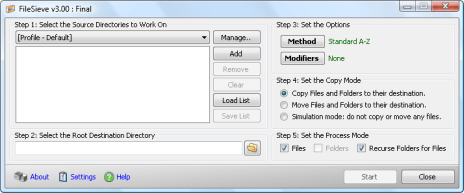

main interface


This software has two main functions:

  • to copy several directories at once and
  • to "sieve" or sort the pasted/moved files or folders accordingly

To start, click the Add button.

add button

Select the files and / or folders you want to be copied. Remember that you can pick an unlimited number of files and folders through different locations. You can even copy from several external hard-disks,
CD drive, and network drives.
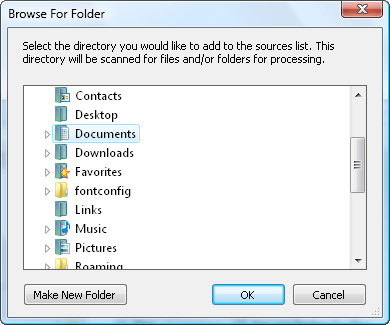

browse for folder

After you're done browsing, choose where you want to paste or move the recently selected source directories by hitting this button.

browse folder

These will be Step 1 and Step 2.


The third step is to select what kind of sorting method you want for the files to be pasted or moved.

method button

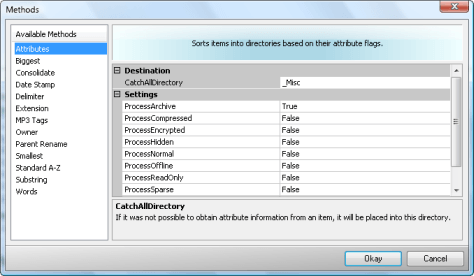
This is the Methods window.


methods window


In here, you can select up to 13 different sorting procedures. Click on each method and you will its description and settings on the right side.
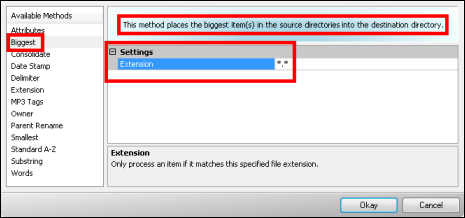

biggest method


Let's try one selection. The Date Stamp method will filter all files according to their processed dates. You can add more sort settings by tweaking the Destination and Settings
options. Almost all methods have Settings.

To continue, select your preferred method, modify some of its settings (if possible), and click the Okay button.
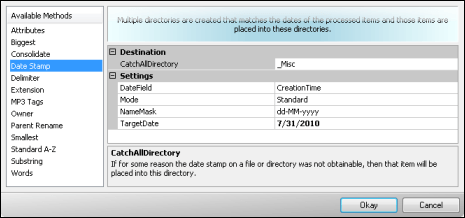

date stamp method


Select a Copy Mode by ticking one of the three choices below.
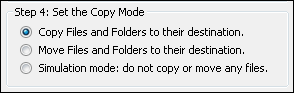

step 4


The last step is the Process Mode. Check or uncheck the Files, Folders, and Recurse Folders for Files checkboxes.


step 5


If all settings are correct and ready, press the Start button. Wait for the process to finish. When it's done, go to your root destination directory and you will see there that all your files and
folders were copied and arranged according to the sorting method you
selected.


start button


Labels:

Print ပဲထုပ်ပါ..pdf ထုပ်လျှင်.ဖောင့်လွဲနေလိမ့်မယ်


မာတိကာ ၁ မာတိကာ ၂ မာတိကာ ၃ မာတိကာ ၄ မာတိကာ ၅
0 comments

850..Windowေတြကို update ပိတ္နည္း [ 24.7.10 ]

 
windows 7 off update
၁။ အရင္ဆံုး Control Panel ဝင္လိုက္ပါ ၿပီးရင္
၂။ ညာဘက္က အေပၚမွာ Category မွာ ကလစ္ၿပီး Large icons ကို ကလစ္လိုက္ပါ ၿပီးရင္

၃။ ေအာက္ဆံုးမွာၾကည့္လိုက္ပါ Windows Update ဆိုတာကို ကလစ္လိုက္ပါ ၿပီးရင္
၄။ ဘယ္ဘက္မွာျပန္ၾကည့္ပါ Change settings ကိုကလစ္လိုက္ပါ ၿပီးရင္ Important updates ရဲ႕ေအာက္နားက ဘားေလးကို Never check for updates (not recommended) ကို ေရြးေပးလိုက္ပါ ၿပီးရင္ OK ေပးလိုက္ပါ။
*******************************************************************
windows vistar off update
ဒါကေတာ့ windows vistar အတြက္ ေအာက္ပါအတိုင္း လုပ္လိုက္ပါ။
၁။ အရင္ဆံုး Control Panal ဝင္လိုက္ပါ ၿပီးရင္
၂။ ဘယ္ဘက္ အေပၚမွာ Control Panal Home ကိုကလစ္လိုက္ပါ ၿပီးရင္
၃။ Security မွာ ေအာက္က Check for updates ကို ကလစ္လိုက္ပါ ၿပီးရင္ ဘယ္ဘက္မွာ Change settings ကိုကလစ္လိုက္ပါ ၿပီးရင္
၅။ Never check for updates (not recommended) ကို ကလစ္လိုက္ပါ ၿပီးရင္ OK ကိုသာနိပ္လိုက္ပါ။

*******************************************************************************
windows xp off update
ဒါကေတာ့ windows xp အတြက္ ေအာက္ပါအတိုင္း လိုက္လုပ္ပါ။
၁။ အရင္ဆံုး Control Panel ကိုဝင္လိုက္ပါ ၿပီးရင္
၂။ Control Panel ထည္းမွာ Security Center ကိုရွာ ေတြ႕ရင္ကလစ္လိုက္ပါ
၃။ ေပၚလာမယ့္ ဝင္းဒိုးမွာ ေအာက္မွာဆံုးမွာၾကည့္လိုက္ပါ Automatic Updates ဆိုတာကို ကလစ္လိုက္ပါ
၄။ ေနာက္ထပ္ဝင္ဒိုးမွာ Turn off Automatic Updates. ကို ကလစ္ေပးၿပီး OK ေပးလိုက္ရင္ရပါၿပီး။

Ref:itnadamtui

Labels:

Print ပဲထုပ်ပါ..pdf ထုပ်လျှင်.ဖောင့်လွဲနေလိမ့်မယ်


မာတိကာ ၁ မာတိကာ ၂ မာတိကာ ၃ မာတိကာ ၄ မာတိကာ ၅
0 comments

725..Windows Enabler – Enable Grayed Out Buttons ( Portable )

 
Windows Enabler is a Free Portable Tool that enables it's user to Enable Grayed Out Buttons. If you have ever needed to force an option in Windows but can't because the option is grayed out, this tool might help you. Windows Enabler can help enable disabled window controls, enable tick boxes, buttons and other controls that are normally disabled. The Enabler tool runs in the system tray and can be turned on or off by simply clicking it's icon.

Note: Just because an option that is normally grayed out can be enabled, does not mean it is safe to use that option. Be careful how you use this software, you can seriously mess something up, if you don't know what your doing.

Windows Enabler In Action

Windows Enabler in action

Extracted Size: 252KB

Free Image Hosting

Labels: ,

Print ပဲထုပ်ပါ..pdf ထုပ်လျှင်.ဖောင့်လွဲနေလိမ့်မယ်


မာတိကာ ၁ မာတိကာ ၂ မာတိကာ ၃ မာတိကာ ၄ မာတိကာ ၅
0 comments

606.. ကိုယ့္စက္ထဲက ေဒတာေတြကို သူမ်ားေတြ USB Drives နဲ႕ကူးသြားမွာမလိုလားရင္


USB Drives နဲ႕ ေကာ္ပီကူးလို႕မရေအာင္ Registry
ထဲမွာသြားျပင္ၾကရမယ္.....

1) Start –> Run ကိုသြားလိုက္ပါ။ regedit လို႕ ႐ိုက္ျပီး Enter
ေခါက္လိုက္ပါ။
2) ဒီလမ္းေၾကာင္းအတိုင္း တဆင့္ျပီးတဆင့္သြားလိုက္ပါ
“HKEY_LOCAL_MACHINE\SYSTEM\CurrentControlSet\Control”
3) keyအသစ္တခုဖန္တီးလိုက္ျပီး StorageDevicePolicies လို႕ နာမည္ေပးလိုက္ပါ
4)StorageDevicePolicies ကို ေရြးျခယ္လိုက္ျပီး DWORD (32-bit) Value ကို
ဖန္တီးလိုက္ပါ။ ျပီးရင္ အဲဒီ DWORD (32-bit) Value ကို WriteProtect
ဆိုျပီး အမည္ေပးလိုက္ပါ။

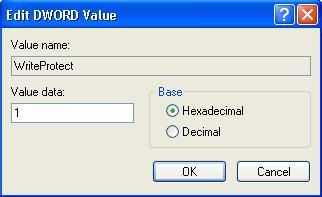
5) အဲဒီ WriteProtect ရဲ့တန္ဖိုးကို ပုံမွာ ျပထားတဲ့အတိုင္း " 1 " လို႕ေျပာင္းေပးလိုက္ပါ။ ျပီးရင္
Registry Editor ကိုပိတ္လိုက္ပါ။ တခါတရံ ကိုယ္ေျပာင္းထားတဲ့ setting
အလုပ္လုပ္ဖို႕ computer ကို restart ခ်ေပးဖို႕လိုပါတယ္။
စက္ျပန္တက္လာတဲ့အခါ သင့္စက္ထဲက ဘယ္ဖိုင္ကိုမွ USB Drives
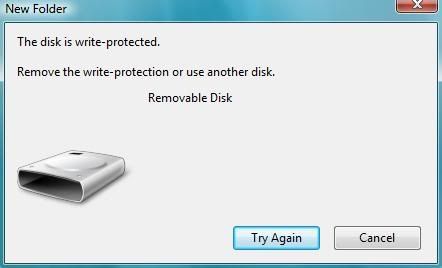
ေတြနဲ႕ကူးလို႕ရမွာ မဟုတ္ေတာ့ပါဘူး။ ကူးလိုက္ရင္ေအာက္ပါအတိုင္း error
message တက္ပါလိမ့္မယ္။ ဒီနည္းကို Window XP SP 2 မွ Vista
အထိသုံးလို႕ရပါတယ္။ ဒါေပမဲ့
ဖိုင္ကူးမဲ့လူက administrator status ရထားရင္ေတာ့ ဒီ setting ကိုအလြယ္တကူျပန္ျပင္လို႕ရပါတယ္။


Labels: ,

Print ပဲထုပ်ပါ..pdf ထုပ်လျှင်.ဖောင့်လွဲနေလိမ့်မယ်


မာတိကာ ၁ မာတိကာ ၂ မာတိကာ ၃ မာတိကာ ၄ မာတိကာ ၅
0 comments

585..Myanmar Computer Ebooks


File Size: 9.83 MB
Protection: Unlimit


source:IT Men


Labels: ,

Print ပဲထုပ်ပါ..pdf ထုပ်လျှင်.ဖောင့်လွဲနေလိမ့်မယ်


မာတိကာ ၁ မာတိကာ ၂ မာတိကာ ၃ မာတိကာ ၄ မာတိကာ ၅
0 comments

518..News results for OS


How to save on office
printer purchase?


Great places for a
festive treat


Travel ideas for your
next holiday.


http://digital.asiaone.com/Digital/Reviews/Story/A1Story20090902-165158.html


Labels: , ,

Print ပဲထုပ်ပါ..pdf ထုပ်လျှင်.ဖောင့်လွဲနေလိမ့်မယ်


မာတိကာ ၁ မာတိကာ ၂ မာတိကာ ၃ မာတိကာ ၄ မာတိကာ ၅
0 comments

392..၀င္းဒိုးမွာ font ေတြကို ပိုမို ၾကည္လင္ေအာင္ လုပ္လို႔ရပါတယ္။ စာဖတ္သူဟာ IE7 ကိုသံုးဖူးရင္ IE7 ရဲ့ Font ေတြဟာ အရင္ကေနနဲ႔ မတူပဲ ေထာင့္ခ်ဳိးေလးေတြမွာ

 
၀င္းဒိုးမွာ font ေတြကို ပိုမို ၾကည္လင္ေအာင္ လုပ္လို႔ရပါတယ္။ စာဖတ္သူဟာ IE7 ကိုသံုးဖူးရင္ IE7 ရဲ့ Font ေတြဟာ အရင္ကေနနဲ႔ မတူပဲ ေထာင့္ခ်ဳိးေလးေတြမွာ ပိုၿပီးေတာ့ ေျပေျပျပစ္ျပစ္ေလး ျဖစ္ေနတာကို သတိထားမိ မွာပါပဲ။ ၀င္းဒိုးဗစ္စတာမွာလည္းပဲ Font ေတြက ဒီလိုပံုစံမ်ိဳးေလး နဲ႔မို႔လို႔ ၾကည့္ရတာ ပိုၿပီးေတာ့ အဆင္ေျပပါတယ္။ ၀င္းဒိုးအိတ္စ္ပီမွာလည္း ဒီလို ျဖစ္ေအာင္ လုပ္လို႔ရပါတယ္။ ျပင္ခ်င္ရင္ေတာ့ ဒီလို လုပ္ၾကည့္ပါဗ်ာ။
Desktop ေပၚမွာ right click ပါ။ Properties ကို click ပါ။

Appearance Tab ကို click ပါ။ Effect ကို click ပါ။

Use the following method to smooth edges of screen fonts ကို check ပါ။ Clear Type ကိုေရြးၿပီးေတာ့ OK ကို ႏွိပ္ပါ။

ဒါဆိုရင္ေတာ့ ရသြားပါၿပီ။ Font ေတြဟာ အရင္ကနဲ႔ မတူေတာ့ပဲ ေထာင့္ဆတ္ဆတ္ၾကီးျဖစ္မေနေတာ့ပဲ အခ်ိဳးပိုက်လာတာ ကို သတိထားမိပါလိမ့္မယ္။


Labels: , , ,

Print ပဲထုပ်ပါ..pdf ထုပ်လျှင်.ဖောင့်လွဲနေလိမ့်မယ်


မာတိကာ ၁ မာတိကာ ၂ မာတိကာ ၃ မာတိကာ ၄ မာတိကာ ၅
1 comments

316.. C Cleaner 2.20.618 (Privacy Software)


2.79MB ပမာဏရွိၿပီးအခမဲ့ရယူႏုိင္သလုိကန္႔သတ္ခ်က္ေတြလည္း ရွိမေနပါ ဘူး။ Windows 95/98/Me/NT/2000/XP/2003 Server နဲ႔ Vista တုိ႔ထဲက တစ္ခုခုကိုတင္ထားလွ်င္ သံုးစြဲႏုိင္ပါၿပီ။C Cleaner က System optimization နဲ႔ privacy tool ျဖစ္ပါတယ္။ ဒီ ေဆာ့ဖ္၀ဲဟာ system ထဲကပံုမွန္မဟုတ္တဲ့ဖုိင္ေတြကိုဖယ္ထုတ္ပစ္ေပးမွာျဖစ္သလုိ Windows ကိုပိုမို လ်င္ျမန္ေအာင္ လုပ္ေပးမွာျဖစ္ၿပီး harddisk ရဲ႕ေနရာကိုလည္းေနရာလြတ္ေတြရရွိေအာင္ လုပ္ေဆာင္ေပးမွာ ျဖစ္ပါတယ္။ ဒီေဆာ့ဖ္၀ဲဟာ Internet Explorer ရဲ႕ Temporary file ေတြ URL history, cookies ေတြ၊ history ရဲ႕ Autocomplete နဲ႔ index.dat တုိ႔ကိုရွင္းလင္းေပးႏုိင္ၿပီး Friefox ရဲ႕ Temporary file ေတြ၊ URL history ၊ cookie ေတြနဲ႔ down- load history ေတြကိုပါ ရွင္းလင္းေပးႏုိင္မွာျဖစ္ပါတယ္။ Windows ရဲ႕ Recycle Bin, Recent Document, temporary file ေတြနဲ႔ log file ေတြကိုပါရွင္းလင္းေပးႏုိင္ပါတယ္။ Registry ကိုလည္းရွင္းလင္းေပးႏိုင္ပါတယ္။


http://www.ccleaner.com/download/builds/downloading-slim


Labels: ,

Print ပဲထုပ်ပါ..pdf ထုပ်လျှင်.ဖောင့်လွဲနေလိမ့်မယ်


မာတိကာ ၁ မာတိကာ ၂ မာတိကာ ၃ မာတိကာ ၄ မာတိကာ ၅
0 comments

315..Abrosoft FantaMorph


Windows 95/Me/NT/2000/XP/2003 Server နဲ႔ Vista တုိ႔ရွိလွ်င္ သံုးစဲြႏုိင္ပါၿပီ။ Abrosoft FantaMorph က အသံုးျပဳရလြယ္ကူတဲ့ ေဆာ့ဖ္၀ဲျဖစ္ၿပီး ႏွစ္သက္ဖြယ္ရာ ႐ုပ္ပံုေတြကို ဖန္တီးေပးႏုိင္သလုိ ႐ႈပ္ေထြးတဲ့ လႈပ္ရွားမႈဆိုင္ရာ effect ေတြကိုလည္း ဖန္တီးေပးႏုိင္ပါတယ္။ Screen Saver ေတြ၊ ၀က္ဘ္ဂရပ္ဖစ္ေတြ၊ ေၾကာ္ျငာေတြ၊ ဗီဒီယိုသီခ်င္းေတြ၊ ႐ုပ္ရွင္ေတြ၊ ပညာေရးဆုိုင္ရာေဆာ့ဖ္၀ဲ presentation ေတြ၊ e-mail နဲ႔အမိ်ဳးမ်ိဳးေသာ အီလက္ထေရာနစ္ document ေတြမွာ Visual effect ေတြကို ထည့္ေပးႏုိင္ပါတယ္။

http://www.brothersoft.com/abrosoft-fantamorph-pro-21912.html


Labels: , , , , , ,

Print ပဲထုပ်ပါ..pdf ထုပ်လျှင်.ဖောင့်လွဲနေလိမ့်မယ်


မာတိကာ ၁ မာတိကာ ၂ မာတိကာ ၃ မာတိကာ ၄ မာတိကာ ၅
0 comments

308.. Free Internet Eraser 3.0


အင္တာနက္အသံုးျပဳၿပီးေနာက္ Windows ထဲမွာက်န္ရွိခဲ့တဲ့ ယာယီဖုိင္မ်ားနဲ႔ ေန႔စဥ္သံုးေနတဲ့ document ေတြကို ေျခရာခံဖ်က္ဆီးေပးမယ့္ေဆာ့ဖ္၀ဲ ျဖစ္ပါတယ္။ ဒါ့အျပင္ Internet Explorer Cache, URL link ေတြနဲ႔ ICQ, MSN messenger လို application ေတြကိုလည္း ေျခရာခံရွင္းလင္းေပးႏိုင္ပါတယ္။ Windows ထဲမွာရွိတဲ့ Internet history ေတြ၊ cache ေတြ၊ cookies ေတြ၊ ယာယီဖုိင္ေတြကို စက္စတင္ဖြင့္တဲ့အခ်ိန္ေရာ ပိတ္တဲ့အခ်ိန္မွာပါ အလိုအေလ်ာက္ ရွင္းလင္းေပးႏိုင္ပါတယ္။

http://www.soft32.com/download_223706.html


Labels: ,

Print ပဲထုပ်ပါ..pdf ထုပ်လျှင်.ဖောင့်လွဲနေလိမ့်မယ်


မာတိကာ ၁ မာတိကာ ၂ မာတိကာ ၃ မာတိကာ ၄ မာတိကာ ၅
0 comments

287..window ရဲ႕အဓိက command Lineေဖာ္ျပေပးထားတဲ့ Site

 
window ရဲ႕အဓိက command Line ေတြနဲ႔ပတ္သက္တဲ့အေၾကာင္းအရာေတြ၊ Task- list, Recovery Console ႏွင့္ ပတ္သက္တဲ့အေၾကာင္းေတြကို ေဖာ္ျပေပးထားတဲ့ Site တစ္ခုပဲျဖစ္ပါတယ္။ Site အတြင္းရွိအေၾကာင္းအရာမ်ားကို အလြယ္္တကူရွာေဖြလို႔ရပါတယ္။
ဒီ Web Site မွာ အဓိကပါ၀င္တဲ့အပိုင္းေတြကေတာ့ Command Line မ်ား File Management, Network and Internet Tools, System Admin & Maintenace, server 2003, Batch File မ်ားစသည္ျဖင့္ Window ရဲ႕အဓိ ကအပိုင္းေတြကို အေျခခံမွစ၍ အဆင့္ျမင့္အထိေလ့လာႏိုင္ေစရန္ တင္ျပေပးထားပါတယ္။
www.commandwindows.com

Labels: ,

Print ပဲထုပ်ပါ..pdf ထုပ်လျှင်.ဖောင့်လွဲနေလိမ့်မယ်


မာတိကာ ၁ မာတိကာ ၂ မာတိကာ ၃ မာတိကာ ၄ မာတိကာ ၅
0 comments

184..ေဒါင္းလုဒ္complete..မျဖစ္ရင္

 
Windows Vista မွာ software ခ်တဲ့အခါ အမ်ားအားျဖင့္ compatibility issue တက္ေနတာက မ်ားေနတယ္။ “The software is not compatible with current version of Windows. Check the solution online.. ..” ဒီလုိမ်ိဳးေတြ လာျပေနျပီဆိုရင္ installer file (.exe) ေပၚမွာ right click -> Properties . ျပီးရင္ ေအာက္က ပုံမွာ ျပထားတဲ့ အတိုင္း Run this program in compatibility mode for ဆိုတဲ့ check box ကို tick လုပ္ျပီး Windows XP (Service Pack 2) ဆိုတာကို ေရြးလိုက္ျပီး OK လိုက္ပါ။ install ျပန္လုပ္ၾကည့္ရင္ အဆင္ေျပသြားပါလိမ့္မယ္။


Labels: , , , ,

Print ပဲထုပ်ပါ..pdf ထုပ်လျှင်.ဖောင့်လွဲနေလိမ့်မယ်


မာတိကာ ၁ မာတိကာ ၂ မာတိကာ ၃ မာတိကာ ၄ မာတိကာ ၅

181.. vista က Disk Defrag က အရမ္းကို ၾကာေနရင္

 
Windows XP သုံးတဲ့အခါ windows မွာပါတဲ့ Disk Defrag ကို သုံးျဖစ္ေပမယ့္ vista က Disk Defrag က အရမ္းကို ၾကာလြန္းတယ္။ တစ္ခါတစ္ေလ တစ္ေနကုန္ေနလည္း မျပီးဘူး။ Progress လည္း မျပေတာ့ ပိုဆိုးတယ္။ အဲဒီေတာ့ ဒီ Auslogics Disk Defrag ဆိုတဲ့ tool ေလးကို သုံးျဖစ္တယ္။ နဂို windows မွာ ပါတာထက္ သုံးရတာ ပိုျပီး အဆင္ေျပ္တယ္။


Labels: , , , , ,

Print ပဲထုပ်ပါ..pdf ထုပ်လျှင်.ဖောင့်လွဲနေလိမ့်မယ်


မာတိကာ ၁ မာတိကာ ၂ မာတိကာ ၃ မာတိကာ ၄ မာတိကာ ၅

166..Windows Shortcut


Windows ကိုသံုးၾကတဲ့လူေတြ Keyboard Shortcut ေတြေတာ္ေတာ္မ်ားမ်ားကို သံုးတတ္ၾကမွာပါ။ အဲဒီထဲကမွ Windows Key နဲ႔တြဲသံုးတဲ့ Shortcut ေလးေတြကို မွ်ေ၀ေပးခ်င္ပါတယ္။ သိသူေက်ာ္သြား မသိသူဖတ္ထားၾကေပါ့ဗ်ာ။

WINKEY + D : Brings the desktop to the top of all other windows.

WINKEY + M : Minimizes all windows.

WINKEY + SHIFT + M : Undo the minimize done by WINKEY + M and WINKEY + D.

WINKEY + E : Open Microsoft Explorer.

WINKEY + Tab : Cycle through open programs through the taskbar.

WINKEY + F : Display the Windows Search / Find feature.

WINKEY + CTRL + F : Display the search for computers window.

WINKEY + F1 : Display the Microsoft Windows help.

WINKEY + R : Open the run window.

WINKEY + Pause / Break key : Open the system properties window.

WINKEY + U : Open Utility Manager.

WINKEY + L : Lock the computer (Windows XP and above only).

Labels: ,

Print ပဲထုပ်ပါ..pdf ထုပ်လျှင်.ဖောင့်လွဲနေလိမ့်မယ်


မာတိကာ ၁ မာတိကာ ၂ မာတိကာ ၃ မာတိကာ ၄ မာတိကာ ၅

162..Advanced Windowscare


Advanced Windowscare Personal Edition ဟာကြန္ပ်ဴတာကို ရွင္းလင္းေရး၊ ကာကြယ္ေရး စတာေတြလုပ္ေပးတဲ့ Tool တစ္ခုပါ။ ကြန္ပ်ဴတာရဲ႕ slow down, freezes, crashes နဲ႔ security threats စတာေတြကို ေျဖရွင္းေပးႏိုင္ပါတယ္။ Spyware နဲ႔ Adware ေတြကိုဖယ္ရွားျခင္း၊ Security Threats ေတြမွကာကြယ္ေပးျခင္း၊ Registry Errors ေတြကို Fix လုပ္ေပးႏိုင္ျခင္း၊ မလုိအပ္တဲ့ Temporary files ေတြကိုဖယ္ရွားျခင္း စတာေတြကိုလုပ္ေဆာင္ႏိုင္ပါတယ္။ အသံုးျပဳပံုကလဲ လြယ္ကူပါတယ္။ ထုတ္လုပ္သူေျပာတဲ့ အဓိကအားသာခ်က္ေတြကေတာ့

• Extremely Easy to Use
Completes its work with just one click. Scans, repairs and gives personal care to your PC in one minute.
• Defends Your PC with 100% Freeware
Scans and removes spyware and adware using up-to-date definition files. Prevents spyware, hackers and hijackers from installing malicious items on your computer. Erases and updates your PC’s activity history.
• Cleans your Windows
Boosts your system’s performance by cleaning missing files, destroying unwanted files, deleting obsolete files, removing junk files, and eliminating corrupt registry entries.
• Keeps Your PC Running at Peak Performance
Tunes up Windows by unleashing the built-in power of your system. Dramatically improves both system and Internet performance.
• Fixes Multiple System Errors
Does more than a registry cleaner, keeping your PC stable and running at peak efficiency. Repairs PC configurations by eliminating system bottlenecks and preventing crashes.
• Safe and 100% Free
100% free with no spyware or adware! Advanced WindowsCare Personal Edition is a safe and trusted solution from a leading software vendor.

User Reviews ေတြအရေတာ့ ေတာ္ေတာ္အသံုး၀င္တယ္....


Labels: ,

Print ပဲထုပ်ပါ..pdf ထုပ်လျှင်.ဖောင့်လွဲနေလိမ့်မယ်


မာတိကာ ၁ မာတိကာ ၂ မာတိကာ ၃ မာတိကာ ၄ မာတိကာ ၅

105.Window XPႏွင့္.Window Vista ေတြမွာ Registry ကို Back Up လုပ္ျခင္း


အဆင္႔(၁) : Start Button ကို Click ပါ။

အဆင္႔(၂) : Search Box မွာ Regedit လို႔ ရိုက္ထည္႔ျပီး Enter ေခါက္လိုက္ပါ။

အဆင္႔(၃) : Registry Editor Windows တက္လာတဲ႔ အခါ.. File ထဲမွ မွတဆင္႔ Export ၀င္ပါ..( လုပ္ပါ)

အဆင္႔(၄) : Export Registry Box တက္လာရင္ File Name ေနရာမွာ ႏွစ္သက္ရာ တစ္ခုခုေပးပါ.(.ရိုက္ထည္႔ပါ ) ။ ျပီးရင္ Export Range ကို All ေရြးေပးပါ။ အားလံုးျပီးသြားရင္ Save ကို Click လိုက္ပါ။


အဆင္႔(၅) : မိမိ Save လိုက္တဲ႔ ေနရာမွာ အေပၚမွာ ျပထားတဲ႔ ပံုအတိုင္း Registry Back Up ဖိုင္ေလး ရရွိလာမွာျဖစ္ပါတယ္။


အဆင္႔(၆) : အားလံုးျပီးသြားရင္ေတာ႔ Registry Editor ကို ပိတ္လိုက္ပါ။ ဒါဆို ျပီးသြားပါျပီ ။


Labels: , , ,

Print ပဲထုပ်ပါ..pdf ထုပ်လျှင်.ဖောင့်လွဲနေလိမ့်မယ်


မာတိကာ ၁ မာတိကာ ၂ မာတိကာ ၃ မာတိကာ ၄ မာတိကာ ၅

060..Windows XP ကိုဘယ္လို Installaလုပ္မလဲ...

 
Windows XP ကို Installaျပန္လုပ္မယ္ဆိုရင္
ဒီေနရာကေန

DOWNLOAD

ခ်နိုင္ပါတယ္........


Labels: , , ,

Print ပဲထုပ်ပါ..pdf ထုပ်လျှင်.ဖောင့်လွဲနေလိမ့်မယ်


မာတိကာ ၁ မာတိကာ ၂ မာတိကာ ၃ မာတိကာ ၄ မာတိကာ ၅

KKZ Myanmar Unicode Keyboard

Mone Tine On Android


►Version 1.0

MoneTineKeyboard

Like လုပ်ထားနိုင်ပါတယ်

Mone Tine Knowledge Bank

Labels

အောက်ကကြေငြာလေးကလစ်ပေးပါဦး

Usage Policies

သင်၏ Facebook  တွင် ဖတ်နိုင်ရန် LIKE လုပ်ခဲ့ပါ..
( အမှန်ခြစ် ပေါ်နေပြီး LIKE ပြီးသားပါက CLOSE ကိုသာနှိပ် ပိတ်ပါ )

ကျေးဇူးတင်ပါတယ် မုန်တိုင်း

ကျန်းမာကြပါစေ